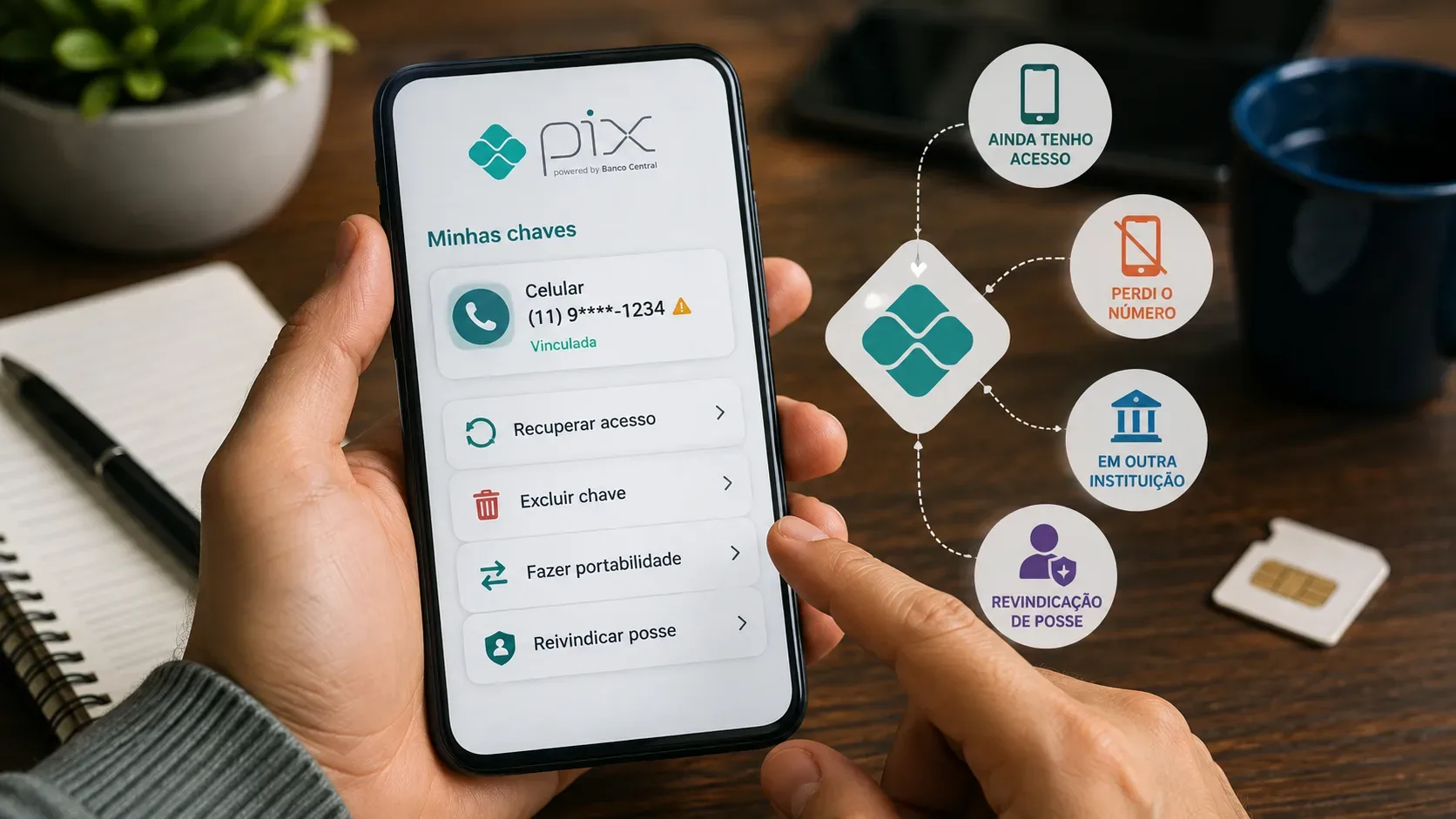
If a Pix key is still tied to an old mobile number, the right solution depends on two questions: do you still own that phone number? and is the key linked to your account or to someone else's? There is no single “recover key” button. In some cases you should delete the key; in others you should request portability; and when the number belongs to you but the key is registered to another person, the appropriate process is an ownership claim.
The safest place to start is the Central Bank of Brazil's Pix Key Report. It shows the Pix keys registered under your identity, the institution to which each key is linked, and the key's status. The current-keys report is available immediately; the complete report also includes the history of deleted keys and can take up to two business days.
First: find out where the key is registered
Before contacting several banks, check the report in Meu BC/Registrato. Access requires a silver- or gold-level gov.br account with two-factor verification enabled. Look for the old phone number and note:
- the institution where the key is registered;
- the linked account, when shown;
- whether the status is active, judicially blocked, or “under ownership claim or portability.”
The Central Bank states that when the report shows “under ownership claim or portability,” the report itself does not identify which of the two processes is underway. You need to contact the institution shown in the report to determine the process.
Which action fits each situation
| Situation | Best action | Where to start |
|---|---|---|
| You still own the number and only want to move the same key to another bank | Portability | At the bank that should receive the key |
| You still own the number but no longer want to use it as a Pix key | Deletion | At the institution where the key is registered |
| The number belongs to you now, but the key is registered to another person | Ownership claim | At the institution where you want to register the number as a key |
| You lost the number and it no longer belongs to you | Delete the old key; do not try to keep it | At the institution shown in the report |
| The key is at an old bank and you can no longer access the app | Request deletion, correction, or access guidance through official support | At the institution identified by the Central Bank report |
If you still have the number: delete or port?
If the SIM and line are still under your control but the number is associated with an old account, there are two different choices.
Deletion
Delete the key when you no longer want that number to work as a Pix key for the current account. The Central Bank says Pix keys can be managed in the institution's app or website, usually in a section such as “My keys.” The Pix Regulation provides that the participant must request deletion of the key when the user asks for it.
After the key is effectively deleted, you can decide whether to register the same number at another account, provided you remain the number holder and the institution completes the required validation.
Portability
Portability is appropriate when the key is still yours and you want to move it from one institution to another. Instead of deleting the key at the old institution and trying to recreate it, start the request at the bank that should receive the key. The DICT — the Pix directory — treats portability and ownership claims as different processes: portability is supported for CPF, CNPJ, phone, and email keys, while an ownership claim applies to phone keys.
Follow the confirmations displayed by the institutions during the process. If the request remains pending, contact both the donor and receiving institutions; the Central Bank report may temporarily display the key as “under ownership claim or portability.”
If the number is yours but the key belongs to someone else: ownership claim
This situation often appears when telecom operators recycle phone numbers. You receive or recover a line that now belongs to you, but when you try to register it as a Pix key, you discover that the number is still linked to another person's account.
In this case, the proper action is an ownership claim. The request is initiated by the institution where you want to register the key. The process exists specifically for a phone number that belongs to the new user but still has an earlier link in the DICT.
Do not confuse an ownership claim with portability. In portability, the owner of the key remains the same and only the institution changes. In an ownership claim, the practical ownership of the phone number is at issue and the institution must follow the Pix validation flow.
If you lost the number and it is no longer yours
If the telecom operator canceled the line or the number was reassigned to someone else, your goal should be to remove that old phone number from your Pix keys. Keeping a number you no longer control as a key creates risk: another person may receive line-validation messages and try to use the number in services that have not yet been updated.
Contact the institution where the key is registered and request deletion. If you cannot access the app, use the institution's official support channels and explain that you need to remove a phone-number Pix key that you no longer possess. Do not try to “claim” a number that is no longer yours: an ownership claim is for the person who currently possesses the number.
What if the old account has already been closed?
The Pix Regulation states that the institution must request deletion of the key, without needing the user's consent, when the transactional account is closed. Therefore, if your report still shows a key linked to an account that should already be closed, the information needs to be corrected by the institution.
Keep protocol numbers, dates, and screenshots of the report. The Central Bank instructs users to ask the institution that supplied the data to correct errors or outdated information first. If the issue is not resolved, you can file a complaint at Consumidor.gov.br or use the Central Bank's contact channel.
Why the bank may require a registered device
Under Pix security rules, key-management operations — registration, deletion, changes, portability, and ownership claims — must be requested from a device previously registered with the institution. If you changed phones, you may need to register the new device before you can complete the operation.
This does not mean the key is lost. It means the bank needs to recognize the device under its security procedures. Register the device only through the institution's official app or internet banking.
Checklist to solve the problem without mixing up the processes
- Check the Pix Key Report and identify the responsible institution.
- Confirm whether the phone number still belongs to you. If it does not, prioritize deletion.
- If the number and key are yours but the key is at another bank, request portability.
- If the number is yours but the key is linked to another person, request an ownership claim.
- If you cannot access the old bank, open an official support case and keep the protocol number.
- If the report is wrong or the institution does not correct the link, escalate the complaint through the channels indicated by the Central Bank.
The key point
A phone-number Pix key is not permanently “stuck” to an old number or institution. The link can be deleted, ported, or submitted to an ownership claim, but the correct choice depends on who controls the phone number and who appears as the key holder. Starting with the Central Bank report prevents you from acting at the wrong institution and helps distinguish a simple access problem from portability or an ownership dispute.
Official sources: Pix Key Reports; Pix key status FAQ; device registration for key management; Pix key FAQ; and the Pix Regulation.