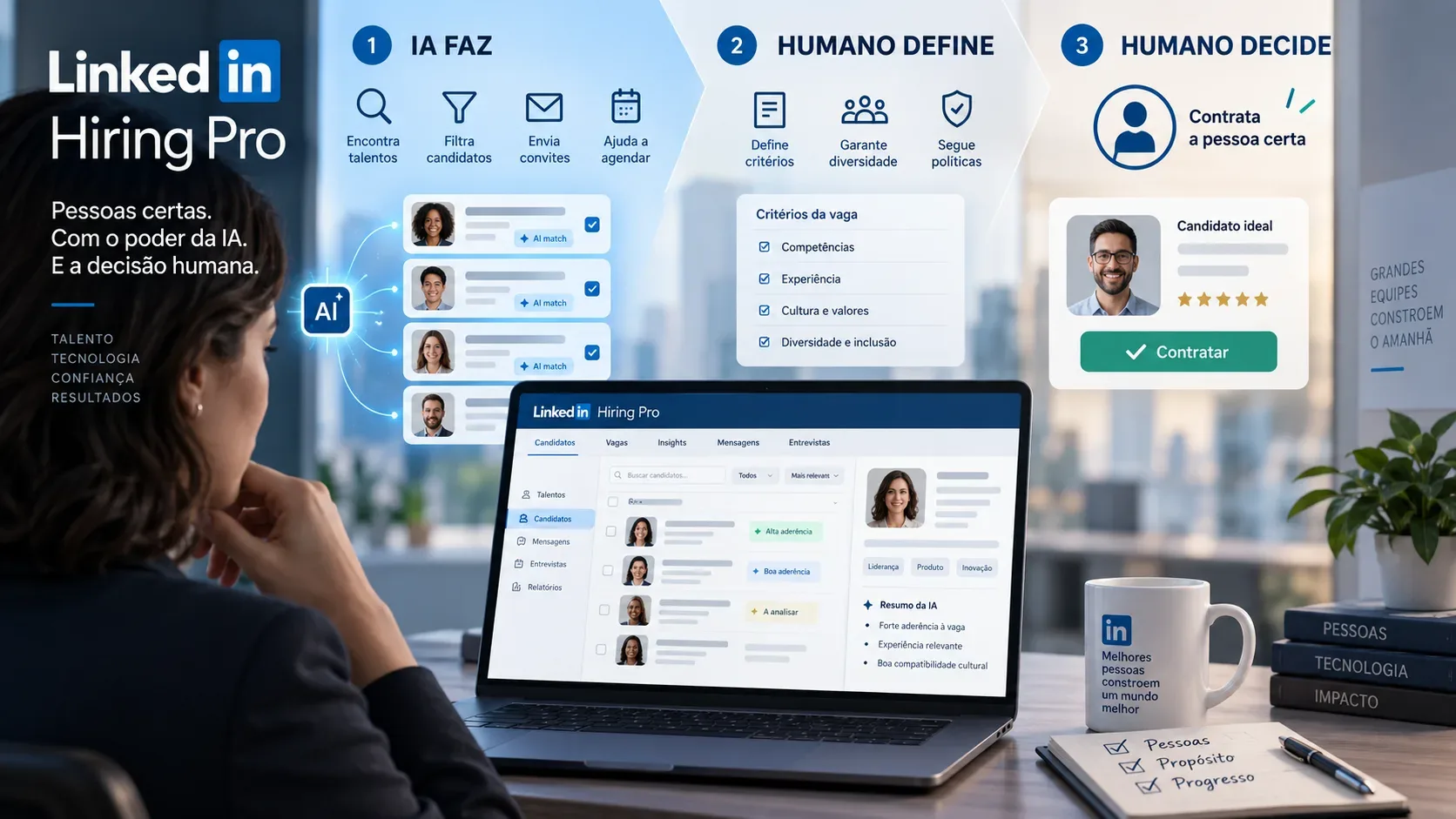
LinkedIn Hiring Pro automates meaningful parts of recruiting, but it does not transfer the hiring decision to AI. In LinkedIn's official documentation reviewed on September 15, 2026, the product is described as an assistant for drafting job posts, evaluating and sorting applications, finding professionals, inviting them to apply, preparing outreach messages, and running an initial AI interview screening. At the same time, LinkedIn states that responsibility for the job post, verification of information, and final hiring decisions remains with the hirer and the organization.
That distinction is the most useful way to evaluate the tool: Hiring Pro can reduce operational work and prioritize people against employer-defined criteria, but the criteria, exceptions, governance, and decisions about who advances or is hired remain human. LinkedIn's help center also warns that AI-generated recommendations and content can contain mistakes and should be reviewed.
Hiring Pro as a matrix: AI does, humans define, humans decide
| Stage | AI does | Humans define | Humans decide |
|---|---|---|---|
| Job description | Creates a draft using the job title, company page, and information from the poster's profile. | Scope, responsibilities, requirements, language, and mandatory information. | What gets published and whether the content is accurate, inclusive, and legally appropriate. |
| Qualifications | Suggests qualifications based on the job description. | Which qualifications are must-have, which are preferred, and the threshold for a “Top Fit” applicant. | Whether the criteria are truly job-relevant and need adjustment. |
| Evaluation and sorting | Compares profile, resume, and screening answers with qualifications and organizes applicants into lists such as Top Fit, Maybe, and Not a Fit. | The comparison criteria and fit threshold. | Reclassify people, review evidence, and decide who continues in the process. |
| Sourcing and invitations | Finds professionals who appear to match and can invite them to apply. | The ideal profile, qualifications, and whether automated invitations are enabled. | Keep or disable the automation and how to handle sourced candidates. |
| InMail outreach | Generates a personalized draft based on the job and the professional's profile. | Tone, context, required information, and outreach boundaries. | Review, edit, and send the message. |
| AI interview | Suggests questions and ideal answers, conducts an audio or video screening when available, and produces a transcript, summary, and rating. | Questions, expected answers, rating settings, and who is invited — except for optional automations enabled by the hirer. | Validate the results and decide who advances to the next stage or is hired. |
What AI can filter and how applicant sorting works
Hiring Pro does not simply “read resumes and hire.” It compares information available in a LinkedIn profile, resume, and screening-question answers with the qualifications defined for the role. The tool can indicate a match, partial match, no match, or insufficient information to evaluate a qualification.
For queue organization, current documentation uses lists such as Top Fit, Maybe, and Not a Fit. Hirers can change the Top Fit threshold, filter by criteria such as location or experience, change sorting, and manually move applicants between lists. One detail matters: shortlisting is not an automatic Hiring Pro decision. According to the FAQ, the shortlist is managed by the hirer and Hiring Pro will “never” shortlist applicants on its own.
Hirers can also open evaluation details to see where the evidence used by AI came from — the profile, resume, or screening answers. This is essential for governance: a high ranking should not replace checking the information that produced the ranking. See LinkedIn's official Hiring Pro features FAQ.
What AI can source and invite
For promoted jobs, Hiring Pro uses qualifications and hirer feedback to look for professionals who may fit the desired profile. The FAQ says the system can suggest up to 25 candidates per day. The hirer can review suggestions individually or allow Hiring Pro to send invitations automatically; that automation can be turned off.
Under the configuration currently described, the system continues inviting suggested candidates until the job reaches 10 applicants classified as Top Fit under the defined criteria. Because the product is being rolled out gradually, limits and experiences may change; the account interface should therefore be treated as the operational source of truth when the job is posted.
For direct outreach, InMail with Hiring Pro creates personalized message drafts based on job context and the sourced professional's profile. LinkedIn instructs hirers to review and edit the text before sending. Credits in this workflow are limited and tied to candidates sourced within the Hiring Pro experience.
What “interviewing with AI” means in Hiring Pro
The AI interview is an initial screening step, not a final interview delegated to the system. The product can create questions and reference answers from the job description; the hirer should review and edit both before sending an invitation. The candidate completes an audio or video conversation when video is available, and the hirer receives the recording, transcript, summary, and an AI-generated rating.
LinkedIn's documentation says hirers can select up to 40 applicants to receive an AI interview invitation. There is also an optional automation, available only to a limited group of users, in which Hiring Pro can send invitations to up to 20 applicants, prioritizing people already shortlisted, marked Top Fit, or meeting the must-have qualifications.
Two boundaries are decisive. First, participation is optional, and declining an AI interview should not automatically disqualify a candidate. Second, LinkedIn tells hirers to review transcripts or recordings, in addition to ratings and summaries, before deciding on advancement. The official AI interviews page explicitly states that final decision responsibility remains with the hirer.
What remains a human definition
Hiring Pro operates from parameters. That means an automation is only as defensible as the criteria feeding it. AI-suggested must-have and preferred qualifications should be reviewed by the hirer. They are not visible to applicants and can be changed during the process, but editing these qualifications does not automatically change the public job post.
That detail can create an inconsistency risk: the public posting may say one thing while internal evaluation starts using something else. The FAQ itself warns that changing qualifications may, depending on applicable law, require a new job post and a new applicant pool. Relevant changes should therefore go through version control and HR/legal review when needed.
The organization also remains responsible for defining screening and interview questions that are job-relevant. LinkedIn recommends avoiding questions that request sensitive information and notes that hirers may have legal duties concerning privacy notices and accommodation.
What remains a human decision
LinkedIn is explicit: Hiring Pro does not make hiring decisions. It makes recommendations and assists with operational tasks, but the job poster must review and verify information before deciding. This applies to a Top Fit classification, a high interview rating, and any recommendation produced by the system.
In practice, this preserves three essential human decisions: who enters the shortlist, who advances between stages, and who receives an offer. Even when automated invitations are enabled, the hirer remains responsible for defining the criteria that feed the automation and monitoring its effects.
Practical requirements: promoted job, language, and where the feature appears
Access is a point that can frustrate teams planning adoption without checking eligibility. In the documentation reviewed, LinkedIn says Hiring Pro is available only to a subset of English-speaking members who promote their jobs. The feature is also described as a gradual rollout, so it may not appear for every account.
AI job-description drafting may appear during job creation, but features such as assisted sorting, continuous sourcing, and invitations depend on promotion. LinkedIn's help center also says Hiring Pro must be selected when the job is first created on linkedin.com and that this selection is not available when posting from the mobile app. The general posting and promotion flow is described in LinkedIn's official job-posting help.
For teams recruiting in Portuguese or Spanish, the restriction to a subset of English-speaking members should be treated as an availability requirement, not a promise of universal language support. Before building a process that depends on Hiring Pro, confirm that the option appears in the account, job post, and market where the team operates.
Governance: five controls before delegating steps to AI
- Freeze criteria before evaluation. Document must-have and preferred requirements and who approved each one.
- Review the evidence source. Use qualification details to check whether a classification came from the resume, profile, or a screening answer.
- Do not treat a score as a decision. Top Fit and interview ratings are prioritization signals, not automatic authorization to advance or reject.
- Review messages and questions. Correct InMail drafts, interview questions, ideal answers, and any required privacy or accommodation notices.
- Audit outcomes. Watch for exclusion patterns, insufficient-information cases, criteria changes, and gaps between automated assessment and human review.
AI interviews also create a personal-data dimension: LinkedIn explains that recordings, transcripts, and derived information are processed to provide the service to the hirer. Under GDPR, the page positions the hirer as controller of AI interview data and LinkedIn as processor. For organizations subject to other laws, the specific obligation should be assessed under the relevant jurisdiction and internal policies.
How to use Hiring Pro without outsourcing responsibility
A prudent implementation starts small. Use AI first for reversible tasks — job-post drafting, initial prioritization, and sourcing suggestions — and compare results with a manually reviewed sample. Then, if criteria are consistent, enable automated invitations or AI interviews for roles where screening is well defined.
Create a simple decision rule as well: AI may recommend; a person must validate before rejecting, advancing, or hiring. That rule is consistent with LinkedIn's own documentation and prevents a prioritization tool from becoming, in practice, an unsupervised decision system.
Hiring Pro's value is in compressing repetitive tasks and expanding the search. Its limit is that automation should not be confused with decision authority. For recruiting teams, the more useful question is not “what can AI do?” but “which decision are we willing to delegate — and what human evidence do we require before acting?”.