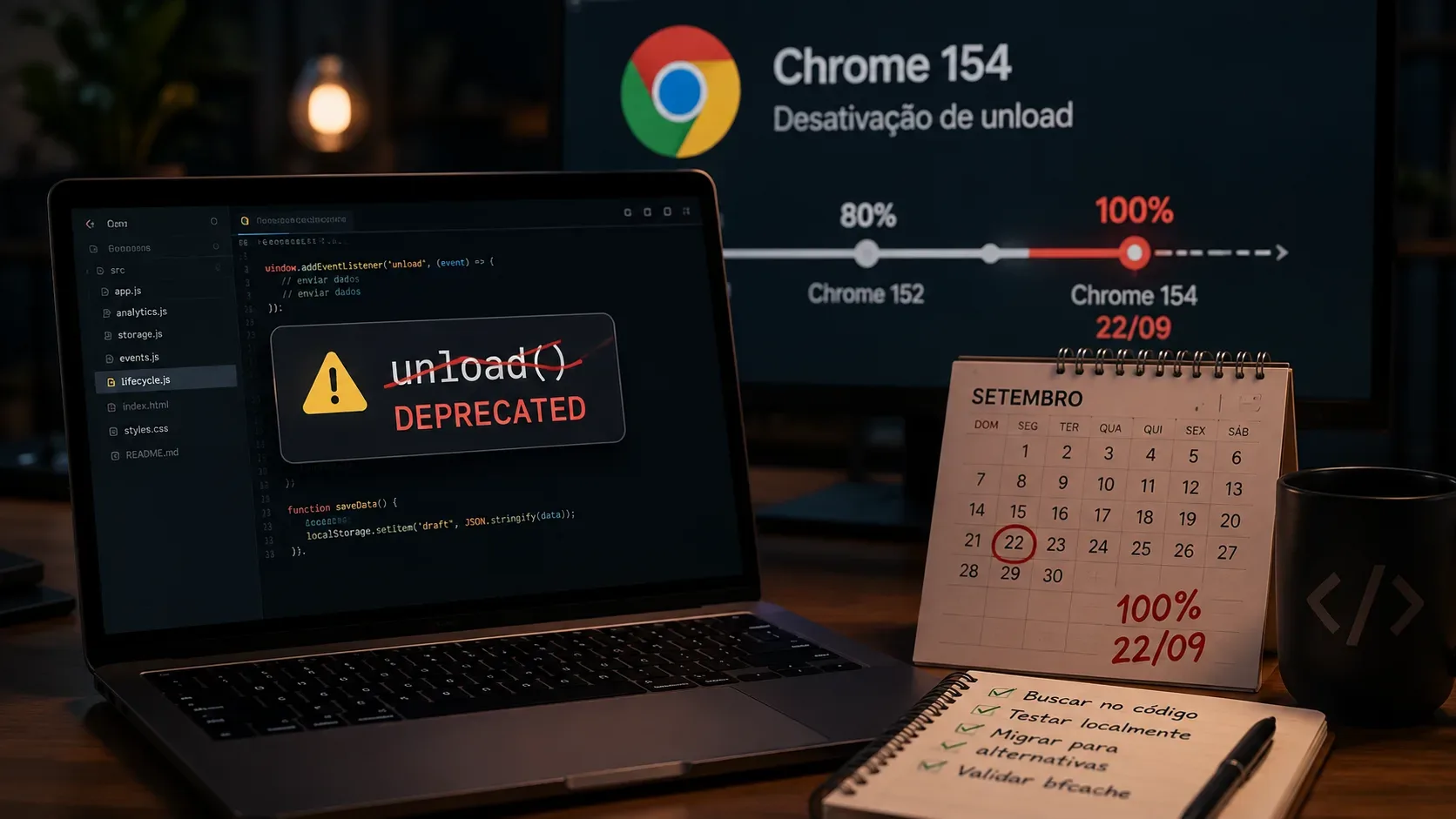
If an application still depends on unload to save state, release resources, or send analytics, migration is no longer merely preventive. Chrome's official schedule, last updated on July 14, 2026, says Chrome 152 reaches 80% of page loads on August 25 and Chrome 154 takes the default deactivation of unload to 100% of page loads in the general rollout on September 22, 2026. The documentation also notes that versions and dates may change as impact is monitored.
That “100%” does not mean the event has been removed from the platform or that every user is affected at once. It means that, in Chrome's published general rollout, the default change covers 100% of page loads: unload handlers stop firing by default unless a site uses a temporary opt-in mechanism. The recommended migration is to remove the dependency on the event, not turn that opt-in into a permanent solution. The primary reference is Chrome's unload deprecation documentation.
What changes in Chrome 154
Chrome began expanding the deprecation to all origins in 2026. The public table progresses through 1%, 5%, 10%, 20%, 40%, 60%, and 80% up to Chrome 152; the next published stage is Chrome 154, at 100% on September 22. There is no Chrome 153 rollout stage in the current table.
In practice, code that treats unload as a guaranteed callback becomes more visibly fragile. This is especially risky when the handler contains a task the product considers mandatory, such as writing the final state of a form, marking the end of a session, or sending a last batch of telemetry.
The problem did not start with Chrome 154. The event was already unreliable, especially on mobile devices, because pages can be backgrounded, frozen, or terminated without a classic “leave page” sequence. In addition, unload handlers interfere with the back/forward cache, or bfcache, which can restore pages quickly when users navigate back or forward.
First step: find every unload dependency
Start with the repository, but do not stop there. Search for unload, onunload, and equivalent registrations through addEventListener. Review first-party code, generated bundles, and third-party integrations that may register the event at runtime.
- Classify each occurrence by purpose: persistence, telemetry, resource cleanup, user warning, or legacy code with no clear effect.
- Identify whether the handler performs network calls, storage writes, connection shutdowns, or global mutations.
- Check analytics libraries, widgets, and tags loaded outside the main bundle.
- Use Chrome DevTools' Back/forward cache test to find listeners that make the page ineligible for bfcache.
- In production, the Reporting API and the notRestoredReasons property can help identify unload usage and reasons a page was not restored from bfcache.
Not finding “unload” in the application's source code does not prove the page is free of it. A third-party script can add the listener after load, which is why runtime auditing matters.
Which alternative to use for each case
| Use case | Main replacement | Implementation concern |
|---|---|---|
| Save drafts or local state | visibilitychange when the document becomes hidden, combined with incremental saving | Do not wait for a “final event” to persist everything; make the operation repeatable and inexpensive. |
| Send analytics or telemetry | visibilitychange + navigator.sendBeacon(); use fetch with keepalive when more control is required | Avoid duplicates because a page can become hidden more than once or be restored. |
| Detect navigation away from a page | pagehide | The event can also precede entry into bfcache; do not assume the document is permanently destroyed. |
| Release and later restore resources | pagehide and pageshow | If the page returns from bfcache, reactivate anything that was suspended or cleaned up. |
| Warn about unsaved changes | beforeunload, conditionally only | Use it only while changes are genuinely unsaved; it is not a guarantee against background termination. |
Persistence: save before the point of no return
For forms, editors, and interface state, Chrome recommends treating the transition to hidden in visibilitychange as the last reliable time to save app and user data. This works best when the system already performs incremental saves during interaction instead of concentrating all responsibility at page shutdown.
The goal is to turn “save on exit” into “keep state sufficiently current.” Then, if the browser process is terminated without another event, the possible loss is limited to the smallest practical interval.
Analytics: separate session semantics from reliable delivery
For small telemetry payloads, navigator.sendBeacon() is designed to send data asynchronously without blocking the next navigation. MDN recommends triggering it when the document transitions to hidden. When a request needs a method other than POST, custom headers, or more control, fetch with keepalive may be more appropriate. See the sendBeacon reference.
Do not treat every visibilitychange as the definitive “end of session.” A user can switch tabs and return. Use event identifiers, checkpoints, or server-side deduplication so metrics are not inflated.
Cleanup: pagehide does not mean permanent destruction
pagehide is appropriate for detecting that the page is being left, but it is compatible with bfcache. If the page enters the navigation cache, its state may later be restored. Therefore, cleanup that leaves the application unable to continue needs a complementary step in pageshow. The Page Lifecycle API documents the relevant states and events.
How to migrate without replacing one bug with another
- Extract the handler logic. Separate the real task from the “unload” trigger. A save, telemetry, or resource-suspension function should be callable from another event.
- Make the operation idempotent. visibilitychange can occur multiple times. Repeating an action must not duplicate requests, analytics events, or incompatible writes.
- Choose the event by meaning. Use visibilitychange for persistence and probable end-of-session telemetry; pagehide for leaving a page; pageshow for restoration; beforeunload only for unsaved-change warnings.
- Handle bfcache restoration. On pageshow, the persisted property indicates that the page was restored from cache. Re-evaluate data that must be refreshed and resources that were suspended.
- Test with unload already disabled. Do not validate only against the browser's current behavior.
How to test now, before September 22
Chrome provides ways to bring the future behavior forward. The chrome://flags/#deprecate-unload option, when enabled as documented, advances the deprecation default and lets you test the application with unload handlers no longer firing. Permissions Policy can also control access to the event at the page or site level. These mechanisms are for testing and contingency, not for keeping the dependency indefinitely.
Build a minimum regression matrix:
- internal navigation and navigation to another domain;
- back and forward history navigation;
- page reload;
- closing the tab;
- switching tabs, minimizing the browser, and, on mobile, switching apps;
- restoring a page from bfcache;
- simulating slow or offline connectivity during autosave and telemetry.
The goal is not to prove there is a new guaranteed “final event.” The goal is to show that the system remains consistent even when the page receives no shutdown callback.
bfcache: migration can change performance and analytics
Removing unload listeners can make more pages eligible for bfcache. That tends to improve back/forward navigation, but it also changes how the lifecycle is observed: a bfcache restoration revives the existing page, including its JavaScript heap, rather than performing a full reload.
For analytics, that means a restoration may not automatically generate the same pageview as a new load. Chrome recommends listening to pageshow and checking event.persisted when the product needs to count restorations. For application data, decide whether any content should be revalidated after restoration. See the web.dev bfcache guidance.
beforeunload is not a general replacement
beforeunload still exists because it solves a different problem: it enables a cancelable warning when a user tries to leave with unsaved changes. It should not replace unload for analytics, persistence, or cleanup. Chrome's guidance is to add it only while unsaved changes exist and remove it as soon as those changes are persisted.
It is also not guaranteed to run when a background tab is terminated. Therefore, even in editors that use beforeunload as a UX safety net, real saving must happen earlier.
Checklist for reaching Chrome 154 without depending on unload
- No critical flow depends on a final unload callback.
- Drafts and important state are saved incrementally and on visibilitychange to hidden.
- Telemetry uses sendBeacon or fetch keepalive when appropriate and includes deduplication.
- Cleanup tied to pagehide can be reversed or reactivated on pageshow.
- beforeunload exists only while changes are genuinely unsaved.
- The site has been tested with the deprecation brought forward and with Back/forward cache in DevTools.
- bfcache restorations have been considered in application data and analytics.
- Any opt-in that keeps unload working is treated as a temporary contingency with a removal plan.
With the 100% stage scheduled for September 22, 2026, the biggest risk is not the disappearance of one isolated API: it is discovering too late that a persistence or telemetry routine depended on an event that was never reliable. A safe migration distributes those responsibilities across the page lifecycle and explicitly tests navigation, backgrounding, and restoration.