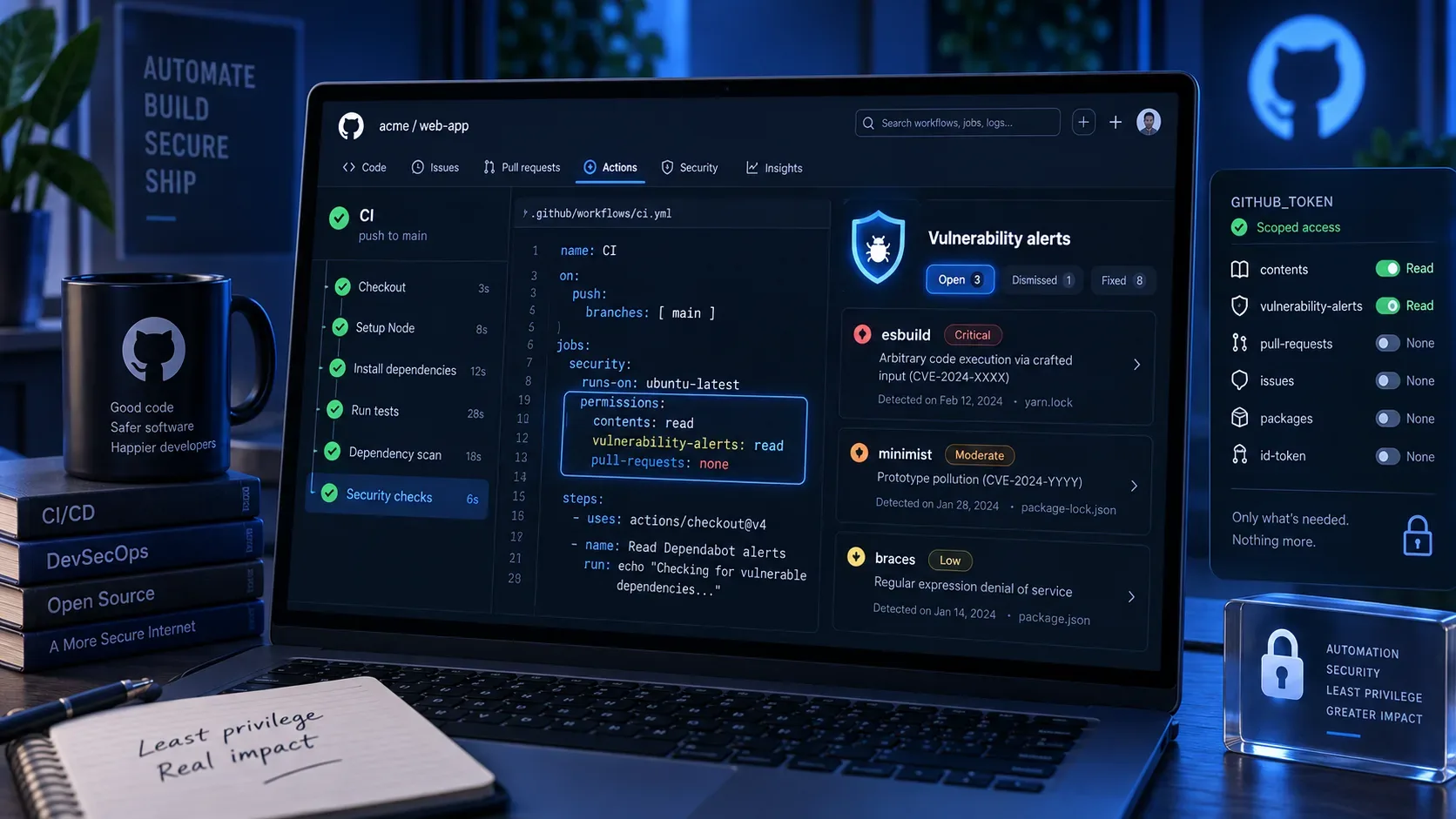
On September 3, 2026, GitHub Actions gained a dedicated permission for a use case that previously often pushed workflows toward broader credentials: vulnerability-alerts. With vulnerability-alerts: read, the GITHUB_TOKEN can list and retrieve Dependabot alerts for its own repository without receiving write permissions and without relying on a personal token just for that read operation. The change was announced in GitHub’s official changelog.
The most important point is that the new permission is deliberately narrow: it accepts only read or none. That makes it a good fit for inventory jobs, triage, reporting, and gates that only need to observe alerts. It does not turn the GITHUB_TOKEN into a credential that can dismiss, reopen, or otherwise modify alerts.
What changed with vulnerability-alerts
The GitHub Actions workflow syntax reference now lists vulnerability-alerts among the configurable GITHUB_TOKEN permissions. According to the workflow syntax documentation, vulnerability-alerts: read allows an action to list Dependabot alerts for the repository; write is not a valid value. The same documentation says that read-all and write-all include this permission as read access, but that is broader than necessary for a job whose only purpose is to query alerts.
Another rule helps enforce least privilege: when you explicitly set access for any permission under permissions, every permission you do not specify is set to none. Therefore, a job with only vulnerability-alerts: read does not automatically receive contents: read, issues: write, or other access. If that job also checks out the repository, add only the access that step actually needs.
Minimal configuration for read-only alert access
If the job does not need to download the source code, the configuration can stay minimal. The example below uses the GitHub CLI to call the current repository’s alerts endpoint and exposes the token only to the command that performs the query.
name: Read Dependabot alerts on: workflow_dispatch: jobs: alerts: runs-on: ubuntu-latest permissions: vulnerability-alerts: read steps: - name: List open alerts env: GH_TOKEN: ${{ github.token }} run: | gh api \ -H "X-GitHub-Api-Version: 2026-03-10" \ "repos/${{ github.repository }}/dependabot/alerts?state=open&per_page=100" \ --jq '.[] | { number, state, package: .dependency.package.name, severity: .security_advisory.severity, ghsa: .security_advisory.ghsa_id }'In this case there is no reason to grant contents: read: the job does not check out the repository or read repository files through the API. If you need to combine alerts with code data, add only the extra scope that is required:
permissions: contents: read vulnerability-alerts: readTo explicitly document that another job must not access alerts, vulnerability-alerts: none is also valid. In practice, it is most useful when you want the security boundary to be obvious in the YAML; if you already declared other permissions and omitted vulnerability-alerts, it will already be none.
Which API calls the new permission covers
The Dependabot alerts REST API provides both read and update operations. For automation using the new GITHUB_TOKEN permission, the practical split is:
| Operation | Endpoint | With vulnerability-alerts: read |
|---|---|---|
| List repository alerts | GET /repos/{owner}/{repo}/dependabot/alerts | Yes |
| Read one specific alert | GET /repos/{owner}/{repo}/dependabot/alerts/{alert_number} | Yes |
| Change state, dismiss, or reopen | PATCH /repos/{owner}/{repo}/dependabot/alerts/{alert_number} | No |
The update endpoint requires write permission for “Dependabot alerts” on credentials that provide that level. Because vulnerability-alerts on the GITHUB_TOKEN supports only read and none, a workflow configured with the new permission should be treated as a data consumer, not as an alert administration tool. If the process truly needs to modify alerts, use an appropriate credential, such as a GitHub App with granular write permission, and keep that flow separate from the read-only job.
What you can extract without granting write access
The API response contains enough information for many triage workflows: alert number and state, package and ecosystem, manifest path, dependency relationship when available, GHSA and CVE identifiers, severity, vulnerable versions, first patched version when known, CVSS, and EPSS when provided. That is enough to generate reports, create internal gates, or feed observability without giving the job authority to modify the repository or the alert itself.
A useful distinction is that “reading alerts” is not the same as “reading code.” Alert access has its own permission. If a script needs to inspect package-lock.json, requirements.txt, or another file after calling the API, it will also need contents: read or another secure way to receive that content.
Least privilege per job is better than per workflow
The permissions key can be defined at the workflow level or inside a job. For this use case, job-level permissions are usually safer. Only the security job receives vulnerability-alerts: read, while build, test, and release jobs remain unable to read the alerts.
permissions: {} jobs: build: runs-on: ubuntu-latest permissions: contents: read vulnerability-alerts: none steps: - uses: actions/checkout@v6 - run: npm test security-report: runs-on: ubuntu-latest permissions: vulnerability-alerts: read steps: - name: Read alerts env: GH_TOKEN: ${{ github.token }} run: gh api "repos/${{ github.repository }}/dependabot/alerts?state=open"This separation also reduces the impact of a compromised third-party action. GitHub’s GITHUB_TOKEN authentication guide recommends limiting the token to the minimum required permissions because actions can access github.token even when the workflow does not explicitly pass the secret as an input.
Reusable workflows: the caller sets the ceiling
With reusable workflows, the called workflow cannot receive more permission than the caller provides. The reusable workflows documentation says that GITHUB_TOKEN permissions can only stay the same or become more restrictive along the call chain. Therefore, if a reusable workflow needs to query alerts, the calling job must grant vulnerability-alerts: read; the called workflow cannot elevate a token that arrived with none.
jobs: audit: uses: org/security-workflows/.github/workflows/dependabot-audit.yml@v3 permissions: vulnerability-alerts: readIn an A → B → C chain, treat the permission as a descending ceiling: if A does not grant read access, B and C cannot restore it. This prevents a reusable workflow from silently introducing more access than the calling repository authorized.
Forks and pull requests: read access is still privilege
Pull requests from forks receive a restricted GITHUB_TOKEN and generally do not receive secrets. GitHub also treats workflows triggered by Dependabot pull requests as though they came from a fork. These rules are documented in workflow trigger events and in the Dependabot on GitHub Actions documentation.
The fact that vulnerability-alerts is read-only does not make it safe to expose that read access to untrusted code. Alerts can reveal packages, versions, and vulnerabilities present in the repository. Avoid granting this permission to a job that checks out and runs code controlled by the author of an external pull request. A safer architecture is to put the query in a trusted job or workflow triggered by workflow_dispatch, schedule, push to a protected branch, or another event that does not execute untrusted content.
If you have a reason to use pull_request_target, follow GitHub’s dedicated security guidance: keep permissions minimal and do not check out or execute the pull request’s untrusted head in a privileged context. The boundary is not only “write versus no write”; preventing the disclosure of security data is also part of least privilege.
Common mistakes when adopting the permission
- Using read-all for convenience. It works for alert reading but grants several other read permissions. Prefer only vulnerability-alerts: read plus any additional scopes that are genuinely required.
- Adding contents: read without needing it. If the job only calls the API, this permission can be removed.
- Trying vulnerability-alerts: write. That value is not supported.
- Expecting the new scope to dismiss alerts. Alert updates require Dependabot alerts write permission and a suitable credential.
- Relying on the repository default. Define permissions in YAML so the job’s contract is explicit and reviewable.
- Forgetting that reusable workflows cannot elevate privileges. The caller must grant read access.
- Running fork code in the same job that reads alerts. Even without write access, that can expose security information.
How to investigate 403, 404, or an empty list
The list endpoint documents responses such as 403 and 404, but those status codes can have more than one cause. First confirm in the workflow that the job actually receives vulnerability-alerts: read and is querying repos/${{ github.repository }}/dependabot/alerts. Then verify that Dependabot alerts are enabled for the repository and that the dependency graph is available.
A 200 response containing [] is not a permission failure: there may simply be no alerts matching the filters you used. For debugging, temporarily remove filters such as state or severity and inspect the raw JSON. A 422, by contrast, points to request validation, such as incompatible or invalid parameters.
Least-privilege migration checklist
- Find workflows that use a PAT, GitHub App, or read-all only to read Dependabot alerts.
- Move alert reading into a dedicated job when possible.
- Set vulnerability-alerts: read at that job level.
- Add contents: read only when checkout or content access is required.
- Keep alert update operations in a separate flow with an appropriate write credential.
- Review reusable workflows to make sure the caller grants the permission without widening unrelated access.
- Do not expose alert reading to fork code or other untrusted inputs.
- Test GET /repos/{owner}/{repo}/dependabot/alerts and handle 403, 404, 422, and an empty list as distinct cases.
For workflows that only need to observe vulnerabilities, the new permission closes an important gap: you can now use GitHub Actions’ own short-lived, repository-scoped token to read Dependabot alerts under an explicit read-only contract. The security benefit comes less from the new YAML keyword itself and more from using it at the smallest possible scope — in the right job, on trusted triggers, without mixing alert visibility with unnecessary write capabilities.