The urgency to find a gift is not just an organizational problem. It also reduces the time available to check the offer, compare prices and confirm who will receive payment.
This scenario led Febraban to publish, on August 3, 2026, a specific alert for Father's Day, celebrated on August 9, 2026. The entity highlighted tempting offers, non-existent stores, sponsored links, fake profiles and payments made without adequate verification of the beneficiary.
The risk is not just a suspicious-looking message. A fake Father's Day promotion can arrive via advertisement, search results, social media or direct contact and lead to a visually convincing page.
Before paying, the most efficient defense is to stop rushing and carry out eight independent checks.
Quick checklist: 8 checks before payment
| Check | Decisive question |
|---|---|
| 1. Origin of the offer | Did I find the store through a channel independent of the ad or message? |
| 2. Domain | Is the address exactly the same as the one published on the company's official channels? |
| 3. Company identity | Business name, CNPJ, address and contacts can be confirmed? |
| 4. Reputation | Is there a verifiable history outside of the store's own website or profile? |
| 5. Price | Does the discount make sense when compared to other stores and previous prices? |
| 6. Purchase conditions | Are the product, shipping, deadline, exchange and service clearly explained? |
| 7. Favored | Does the name and CPF or CNPJ displayed before payment correspond to the company? |
| 8. Payment method | Does the chosen method offer protection compatible with the risk of the purchase? |
If an essential response is pending, do not pay. A true promotion can be verified. Pressure to prevent verification is in itself a reason to stop purchasing.
1. Leave the ad and look for the store another way
Do not use the link received as the only proof that the store exists.
Close the message, ad, or promotional page and search for the company separately. You can open the official app already installed, use a previously saved address or locate the brand's public channels without depending on the offer that initiated the purchase.
Febraban recommends caution even with sponsored links in search engines, because the prominent position of an ad does not prove that the address belongs to the advertised company. The entity also recommends avoiding links sent in messages and giving preference to well-known websites.
This independent search serves to answer a simple question: does the same promotion exist in the store's official environment?
If the offer appears only on an isolated page, in a newly found profile or in a private conversation, the risk increases.
2. Compare the domain character by character
Finding a website with the company name and colors is not enough. The address must match the domain published on official channels.
Look at the main part of the address, not just words that appear before or after it. Small differences can go unnoticed when someone is in a hurry. Febraban's alert mentions cloned pages in which only one character is changed.
Make the comparison without copying the address sent by the seller. Open the domain obtained through the official channel and see if the product, price and conditions appear there.
Also, don't treat a browser lock or a well-designed page as sufficient collateral. These elements indicate technical characteristics of the connection or presentation, but do not replace confirmation of the company's identity.
3. Confirm CNPJ, business name, address and contact
Virtual stores must present clear information about the supplier. Decree No. 7,962/2013 determines that e-commerce environments display, in a prominent place, data such as business name, CPF or CNPJ, physical and electronic address, offer conditions, additional expenses and payment methods.
Copy the CNPJ provided by the store and consult it at the official Federal Revenue service. The query allows you to check the registration status, business name and information on the membership and administrators. The public service was updated on July 29, 2026.
Compare:
- business name and name presented by the store;
- registration status;
- economic activity;
- address;
- service channels;
- identity informed upon payment.
An active CNPJ is an indication, not a certificate that the page is legitimate. Data from real companies may appear out of context. The set needs to be coherent.
If the website advertises a brand, the CNPJ belongs to a company with no apparent relationship to the activity and the customer service does not explain the discrepancy, stop the purchase.
4. Research reputation outside of the store's controlled environment
Reviews published on your own website or profile are not independent confirmation. Look for records in external sources, noting recurring complaints, company responses and reports about delivery, refunds and service.
Procon-SP maintains the Avoid these Sites list, made up of addresses that received complaints, were notified and did not respond or were not located. The list consulted was updated on May 12, 2026.
The presence of a domain in this relationship is an objective signal not to proceed. The absence, however, does not prove that the store is safe: new or unreported pages may not be included in the database.
See also:
- Procon channels in your region;
- public complaint platforms;
- old results about the company;
- official profiles maintained over time;
- comments that describe concrete experiences, not just generic praise.
CERT.br summarizes the preventive stance in three questions: is the website or contact official, the identity of the other party has been confirmed and the data has been checked before payment.
5. Compare current price and offer history
A discount should not be evaluated solely in relation to the price marked on the page itself.
Search for the same model in different establishments and compare the total price, including shipping, deadline, warranty and any accessories. Procon recommends comparing prices between stores to check whether the promotion is real and to be wary of offers that are well below the market.
When there are reliable price history tools for that category, check the evolution of the value. It's also worth looking for previous ads from the store itself.
Ask:
- Is the product exactly the same model?
- does the discount remain exceptional after shipping?
- was the previous price actually charged?
- are other reliable stores in the same range?
- Does the page try to prevent comparison with a countdown or supposedly minimum stock?
Low price alone does not demonstrate fraud. The problem appears when it is combined with urgency, uncertain identity, advance payment and the absence of verifiable channels.
6. Read the conditions before providing data
A legitimate store must explain what it is selling, how much it will be charged and how the purchase will be fulfilled.
Before registering or paying, check:
- product description and model;
- final price;
- shipping value;
- delivery deadline and method;
- availability;
- exchange policy;
- warranty;
- channels for cancellation and complaints;
- document that will be issued after purchase.
This information is part of the obligations foreseen for electronic commerce. Decree No. 7,962/2013 also requires mechanisms for service and confirmation of hiring.
Incomplete texts, policies copied from another company, contacts that do not work or price changes in the final stage must suspend the purchase.
Avoid providing CPF, card, password, authentication code or photo of document just to “book” a promotion. Registrations must be proportional to the purchase and carried out in the official environment.
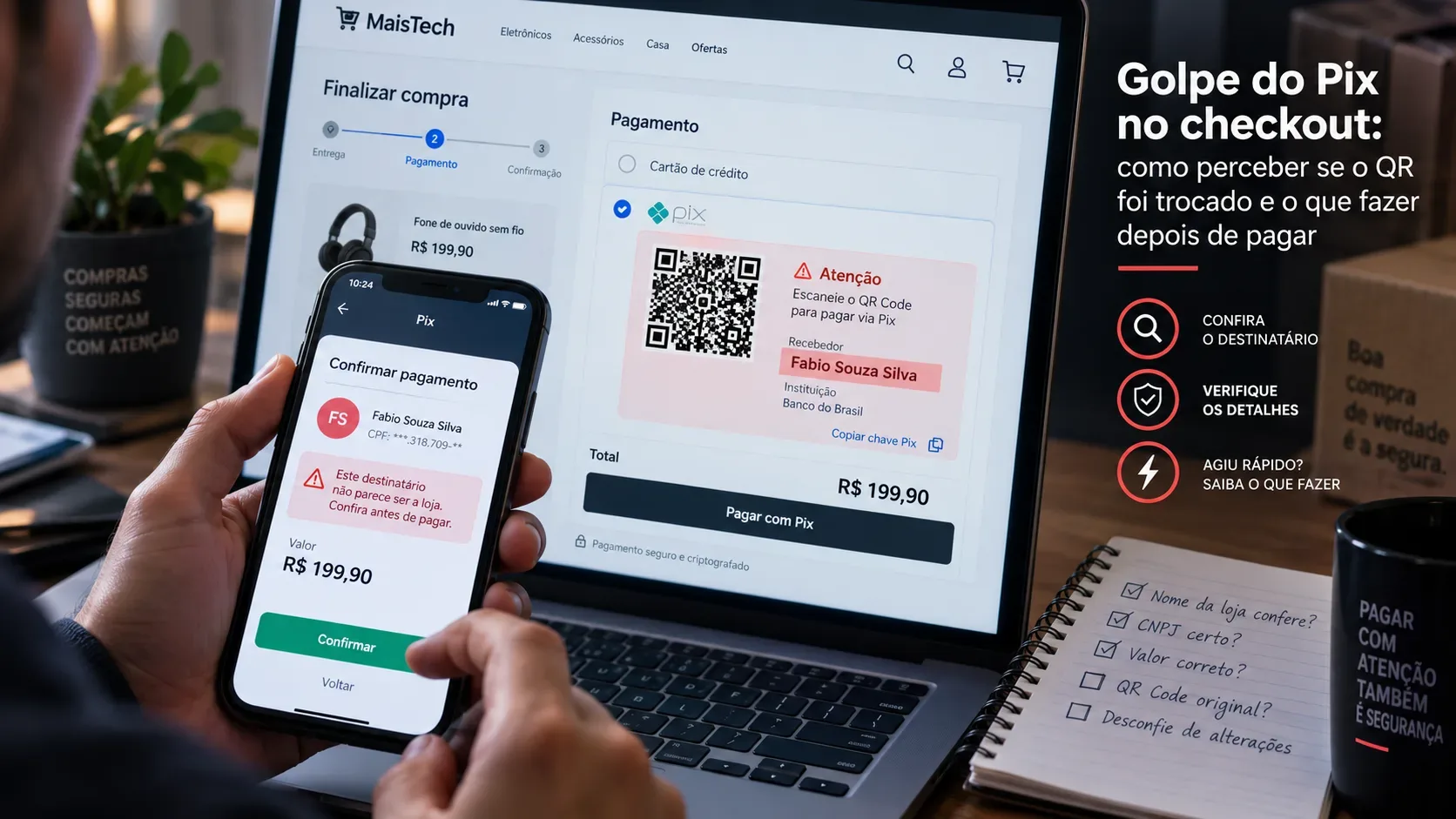
7. Check the beneficiary before the Pix or bill
The payment confirmation screen is a final security barrier.
Before authorizing a Pix, check the name of the recipient and the CPF or CNPJ displayed by the banking app. On the bill, check the beneficiary's details. Febraban advises that the consumer carefully compares the beneficiary and the CNPJ with the company that should receive the amount.
Stop if:
- the payment is directed to an unknown person;
- the name has no apparent relationship with the store;
- the CNPJ is different from the one published;
- the seller changes payment details during the conversation;
- there is pressure to ignore divergence;
- payment must be made outside the normal purchase environment.
Some legitimate companies use brokers, business groups, or legal names other than their trademark. This does not automatically mean fraud, but the discrepancy must be confirmed on the official channel before payment.
Do not accept as a sufficient explanation just a message from the same seller who sent the discrepant data.
8. Choose a payment method compatible with the risk
The payment method does not turn an unknown store into a trustworthy store, but it can limit exposure.
For online purchases, Febraban recommends using a virtual card generated in the bank's application. It reduces the exposure of physical card data, although it does not eliminate the risk of a fraudulent purchase.
Pix is instantaneous. In case of fraud, there is the Special Return Mechanism, the MED, but it does not function as an automatic refund guarantee. The Central Bank informs that the refund depends on the analysis of the case and the existence of resources in the accounts involved.
That's why:
- don't use the additional discount on Pix as a reason to skip the checks;
- prefer to pay within the official store environment;
- check again the amount, name and document of the beneficiary;
- save advertisement, order, receipt and confirmation of purchase;
- do not complete the operation while there is disagreement.
The best protection occurs before confirmation.
Simulated scenario: an offer that does not pass the checklist
Imagine an advertisement for a smart watch for less than half the price found at major retailers. The page informs that stock ends in a few minutes and offers an additional discount for immediate payment via Pix.
Instead of paying, the buyer:
- close the ad;
- looks for the brand through an independent channel;
- you discover that the promotion does not appear on the official website;
- compares the addresses and identifies which domains are different;
- consult the CNPJ displayed on the page;
- realizes that the company's data does not explain the relationship with the brand;
- starts Pix just to view the recipient, without confirming;
- finds a name that does not match the store and cancels the operation.
No single signal would need to terminate the analysis. The combination of a divergent domain, absent promotion on the official channel, inconsistent identity and recipient without a verifiable relationship is enough to not pay.
The purpose of the checklist is not to technically prove that a page was created for fraud. It is to prevent the consumer from transferring money while the identity of the seller remains uncertain.
What to do if payment has already been made
Payment by Pix
Contact your bank immediately through official channels and dispute the transaction in the Pix area or at the institution's customer service.
The Central Bank informs that requests related to fraud, scam or crime can be registered within 80 days, but acting quickly increases the chances of recovery. MED does not guarantee full or partial refunds.
Save:
- Pix receipt;
- identification of the beneficiary;
- ad;
- page address;
- request;
- messages;
- hours and service protocols.
When necessary, file a police report and provide the documents requested by the financial institution. The Central Bank recommends communicating to the bank as quickly as possible and formalizing the complaint with the available proof.
MED does not automatically apply to any purchase issue. The Central Bank differentiates between fraud and commercial disagreement, such as a dispute with a bona fide seller over the product received.
Payment by card
Contact the bank or issuer immediately through official channels, report the suspicious purchase and follow the dispute procedure.
If card data was entered on a possibly false page, request an evaluation to block or replace the card and monitor subsequent movements.
Informed data or passwords
Change the affected passwords, starting with email, bank and accounts that reuse the same credential. Enable two-factor verification when available and monitor access attempts.
Do not call numbers sent by the supposed seller. Use the app, the back of the card or the institution's official website.
Reporting the page or ad
Record the incident on the platform where the advertising appeared and look for Procon or official consumer protection channels.
Preserve the evidence before the page is removed, but do not continue chatting or submitting new data to try to “confirm” the scam.
The safety rule for urgent purchases
Reliable promotion must survive a few minutes of verification.
Before paying for a Father's Day gift, do an independent search, compare the domain, consult the company, research the reputation, evaluate the price, read the conditions, check the recipient and consciously choose the payment method.
Save this checklist and only use official bank and store channels. When the seller's identity cannot be confirmed, the safest decision is to abandon the offer.