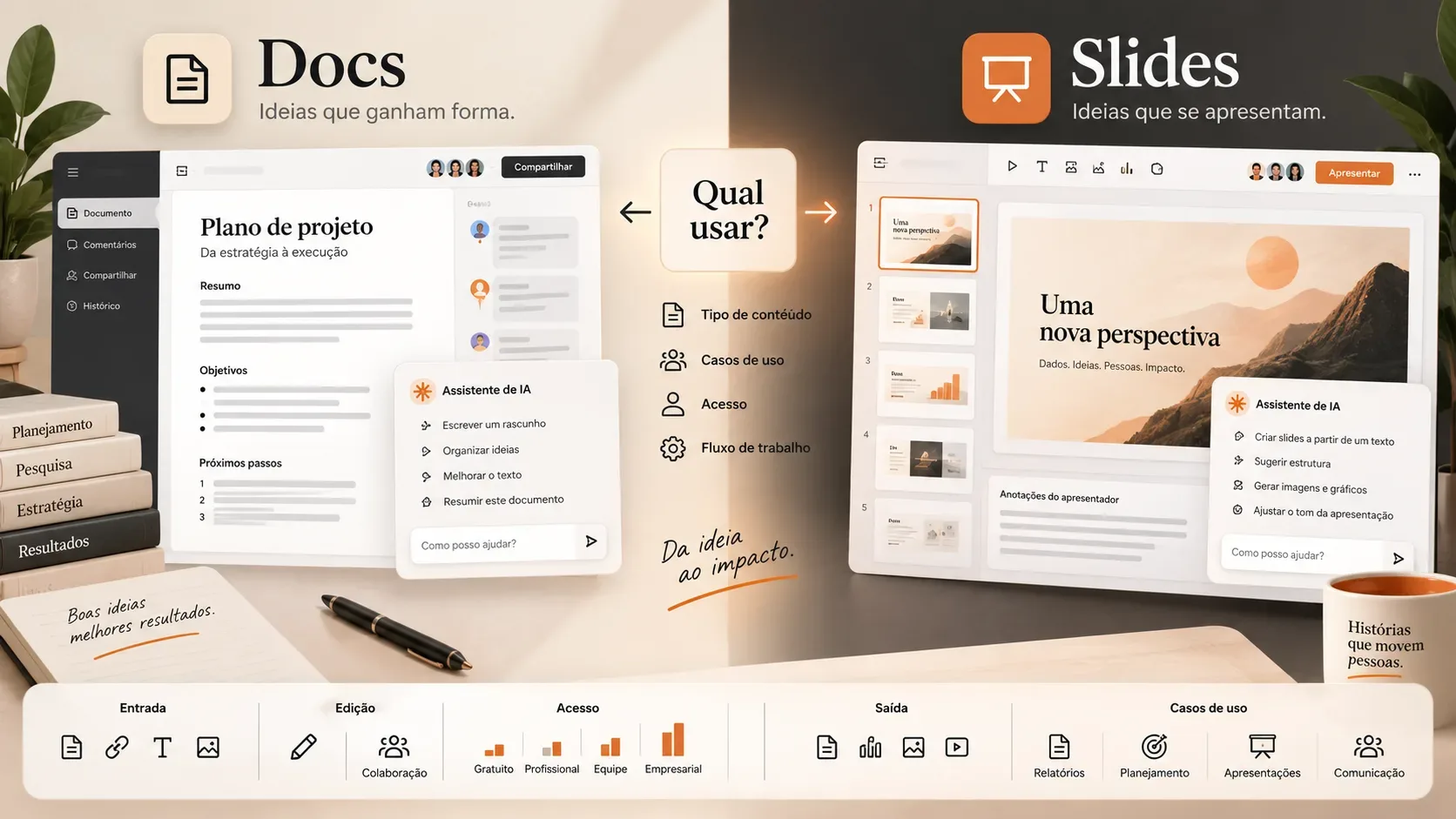
Claude Docs and Claude Slides arrived as two different tools for turning a Claude conversation into material that remains editable. The most useful distinction is simple: Claude Docs is designed for living documents, where text, comments, charts, and collaboration keep evolving; Claude Slides is designed for presentations, with deck structure, slide editing, sharing, and presentation-format exports.
The two tools were announced on September 16, 2026, alongside the change that merges chat and Claude Cowork into a single experience. That creates an important point of confusion: the launch of Docs and Slides and the rollout of the unified interface are not exactly the same thing. Anthropic says Docs, Slides, and Design are in beta on paid plans, while the new experience that removes the Chat versus Cowork choice starts with Pro and Max and will expand gradually.
Claude Docs and Claude Slides in one sentence
- Claude Docs: use it when the main result should be a document that will continue to be written, reviewed, commented on, and updated.
- Claude Slides: use it when the main result should be a deck that will be presented, shared, or exported as a presentation.
This separation was created because slide decks became one of the most common uses of Claude Design. Anthropic now gives decks their own starting point in Claude Slides, while Claude Docs covers collaborative documents produced inside the same conversational context.
Direct comparison: input, editing, output, and best use
| Criterion | Claude Docs | Claude Slides |
|---|---|---|
| Main goal | Create and maintain living documents | Create presentations ready to present or export |
| Typical inputs | Conversation, files, data, and content from connected apps | Notes, reports, files, previous conversations, data, and existing decks |
| Editing | Direct document editing, requests to Claude, and comments | Direct slide editing or requests for changes to Claude |
| Collaboration | Real-time collaboration with view or edit access | Deck sharing and access levels depending on plan and configuration |
| Confirmed outputs | Word, PDF, Markdown, and Google Docs | Google Slides, PowerPoint/PPTX, and PDF |
| Best choice when | The content still needs to evolve as text, a specification, guide, or report | The story needs to be organized into slides for a meeting, review, pitch, or presentation |
What Claude Docs does
According to the official Claude Docs guide, the tool lets you ask for a document in any conversation, watch the draft take shape, and keep editing without moving the content into another app. Claude can ask clarifying questions, leave comments explaining writing choices, and receive new instructions to revise sections.
Editing is not limited to the model. The user can type directly in the document, while other people with edit permission can work in the same material. You can also mention Claude in comments to request a specific change. This makes Docs a better fit for artifacts that need to remain open to revision, such as product specifications, briefs, plans, reports, onboarding guides, and project documents.
Docs can also include charts, diagrams, timelines, and other visualizations based on data from connected apps. There is an important limitation: those charts do not refresh automatically. When the source changes, you need to ask Claude to fetch the latest data and update the visualization.
What Claude Slides does
Claude Slides turns notes, reports, files, or an existing conversation into a deck. The official Artifacts page cites presentations for board meetings, QBRs, roadmap reviews, and design reviews, as well as workflows where Claude uses connected data or a previous deck as a reference.
After the deck is created, users can edit slides directly or request changes in the conversation. They can also present from Claude and export the result. Anthropic confirms PowerPoint and PDF exports, and its product page also lists Google Slides among the destination formats.
Slides is especially useful when visual structure is part of the deliverable. If a report needs to become an executive presentation, for example, Claude can start from the existing document or file, select the points that deserve a slide, and assemble a presentation sequence. Anthropic also confirms that a Claude Docs document can be turned into a presentation with Claude Slides.
When to use Docs instead of Slides
Choose Claude Docs when the material still needs to act as the textual source of truth. That includes situations where people need to review paragraphs, leave comments, add context, track changes, and return to the same document later. A PRD, internal policy, operating guide, or detailed report will usually fit better here.
Choose Claude Slides when the priority is to lead a presentation. Slides imposes a more concise structure in which each screen needs a role in the story. It is a more natural choice for a pitch, leadership meeting, quarterly update, project review, or any situation where an audience will see the content in sequence.
There is also a hybrid workflow: start in Docs to consolidate the analysis, then ask Claude to turn the document into Slides. That keeps the detailed content as a reference while producing a shorter version for presentation.
What changed when Chat and Cowork became one
The September 16 announcement was not only about two new editors. Anthropic also started removing the separation between chat and Cowork. In the new experience, users describe the result they want in a conversation and Claude decides which capabilities to use. The company describes this as a “one Claude” experience.
In the official announcement, Anthropic explains that quick tasks and longer work now start in the same place. Docs, Slides, and Design also enter that flow. A report and the presentation derived from it can come from the same conversation, using the same context, files, and connected sources.
This reduces the need to decide which mode to open first. Even so, the final format still matters. Asking for a document leads to an artifact suited to reading and revision; asking for a deck leads to a presentation structure.
Who has access now: do not confuse the tool with the interface
As of September 17, 2026, Anthropic's official Artifacts page says Claude Docs, Claude Slides, and Claude Design are in beta on paid plans. For Claude Docs specifically, the Help Center lists availability on Pro, Max, Team, and Enterprise, with no Free plan access. Docs is on by default on Pro, Max, and Team; on Enterprise, it is off until an administrator enables it. Some enterprise configurations, including CMEK, zero data retention, and HIPAA-ready environments, still cannot use Docs.
Claude Slides is likewise presented by Anthropic as a beta feature on paid plans, and Enterprise administrators control enablement for Artifacts features. For organizations, therefore, having an eligible subscription does not necessarily mean the feature is already enabled for every user.
Separately, the new interface that merges Chat and Cowork is rolling out gradually to Pro and Max first on web, desktop, and mobile. Team and Free are scheduled to receive the new experience later. Anthropic says Enterprise administrators will receive at least 30 days' notice before changes affect their organizations. This means a user can have access to an Artifacts feature without yet being on the unified interface, or receive the new interface without every paid feature being included in their plan.
What is confirmed and what is still rolling out
Confirmed now: Docs and Slides exist as separate beta tools; Docs supports collaborative editing and export to Word, PDF, Markdown, and Google Docs; Slides creates decks, supports editing, and exports to presentation formats; both are part of the Artifacts strategy and can be used from a conversation context.
Still rolling out: the unified experience that replaces the Chat versus Cowork choice is being distributed gradually. Concrete availability may vary by plan, organization, platform, and administrative configuration. Anthropic also describes Docs and Slides as beta, so behavior, limits, and sharing options can still change.
Reuters coverage reinforces the strategic meaning of the announcement: Anthropic is bringing document creation, presentations, and Cowork tasks into one experience to reduce tool switching. For the user, however, the practical choice remains straightforward: a living document in Docs, a presentation in Slides.
Practical summary for choosing
- Use Docs for reports, PRDs, briefs, guides, policies, plans, and material that must keep being revised as a document.
- Use Slides for pitches, QBRs, leadership meetings, design reviews, project presentations, and stories that need to work slide by slide.
- Use Docs first and Slides second when you need to keep a detailed version and also present a visual summary.
- When checking availability, separate two questions: does your plan include the beta feature? Has your account already received the new unified interface?
This distinction avoids the main misunderstanding around the announcement. Claude Docs and Claude Slides are not merely two ways to export the same text. They represent two different work formats inside the same Claude context, while the Chat and Cowork unification changes where those workflows begin.