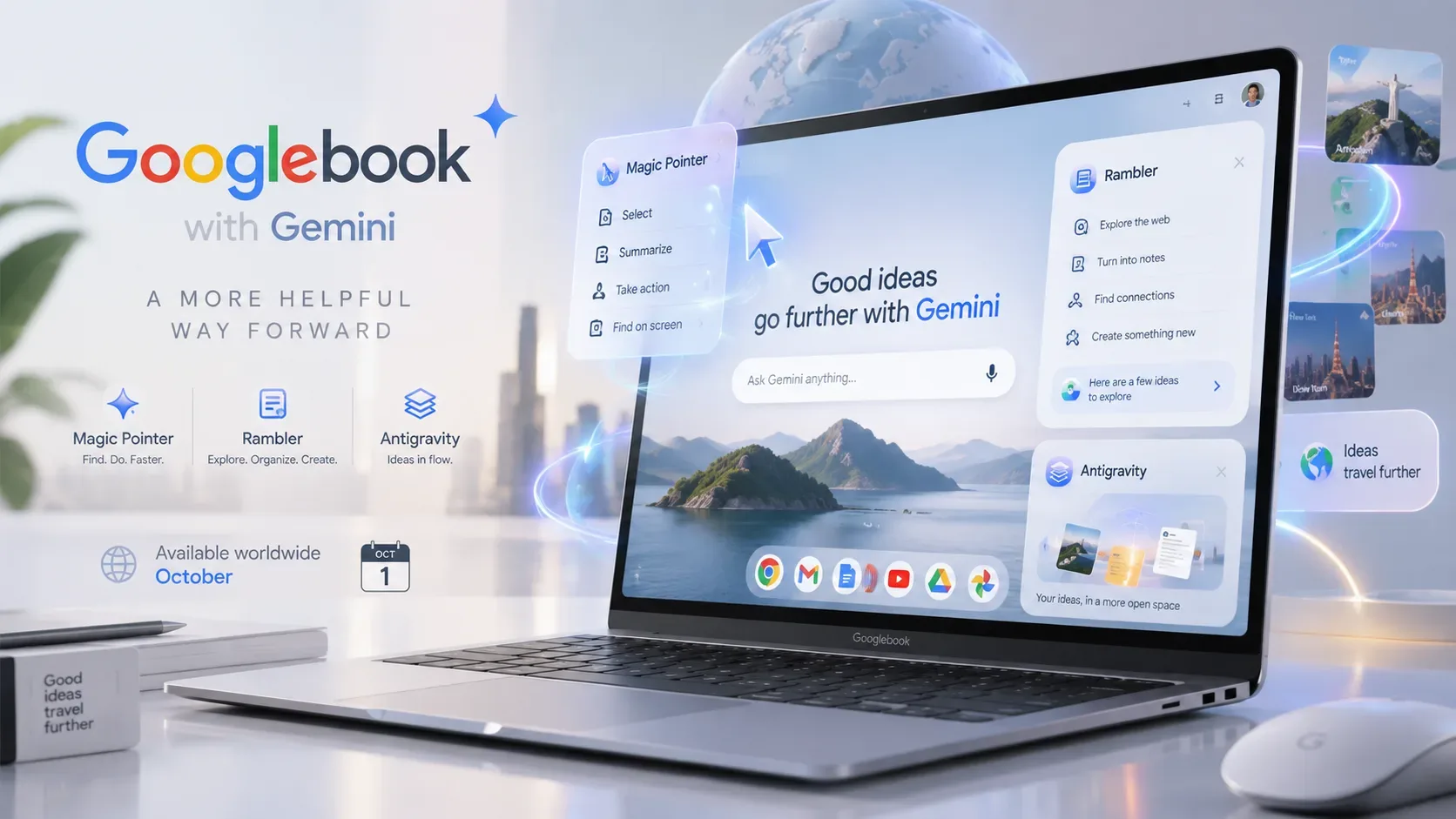
Googlebook is entering pre-order as a new Google laptop category built on the Android technology stack and desktop foundations from ChromeOS. The launch centers on bringing Gemini into the computer workflow instead of limiting it to a separate chat window. The lineup starts at US$899 and is scheduled to reach stores on October 4, 2026 in the United States and October 5 in six other announced markets. Brazil is not included in this first list.
What Googlebook with Gemini is
According to Google, the first Googlebooks will be made by Acer, ASUS, Dell, HP and Lenovo. The concept combines desktop-class Chrome, Android apps, integration with Android phones and AI features built into the operating experience. Instead of treating Gemini only as a chatbot, Google places it in cursor actions, voice dictation, widgets, automations and background tasks.
This approach is clearest in four features highlighted in the announcement: Magic Pointer, Rambler, Create My Widget and Antigravity. They are not interchangeable. Each one covers a different part of how the laptop is used.
Magic Pointer and Rambler: what is the difference
| Feature | How it is activated | What it does | Announced examples |
|---|---|---|---|
| Magic Pointer | A quick cursor wiggle brings Gemini to the content on screen. | Understands text, images and context to act directly on what the user points to or selects. | Turn a training plan into Google Calendar events, analyze a suspicious message and combine images into a visualization. |
| Rambler | Opened as a voice feature next to the Quick Insert key. | Turns free-form speech into organized text while removing mistakes, hesitations and filler words. | Structure meeting notes, create action items, generate lists and switch languages in the middle of a sentence. |
The core of Magic Pointer is visual context. Users do not need to copy content into another window and then explain to Gemini what they are looking at. The feature works with material selected on screen. Google says it only activates when summoned by the cursor gesture and can be turned off.
Rambler, by contrast, is a voice expression tool. Its difference from conventional dictation is that the goal is not to transcribe every spoken word literally. The system interprets intent, cleans up repetitions and errors, and reorganizes the content into a more shareable format. Multilingual support allows users to switch languages during the same spoken passage.
Create My Widget and Antigravity serve different uses
Create My Widget lets users build widgets by describing in natural language what they want to track. Google gives examples such as a sports-score widget or a visual countdown to a trip. The idea is to remove the need for programming knowledge when creating small personal desktop tools.
Antigravity sits at a different level. Google says the platform comes with every Googlebook and can be used to write, test and deploy apps directly on the laptop. Developers also get a full Linux environment with terminal access for tools such as Claude Code or Antigravity CLI. In practical terms, Create My Widget targets no-code customization, while Antigravity extends the device toward more advanced development and automation.
What other Gemini features are built in
The announced AI package includes task automations, Gemini Live and proactive suggestions based on what is on screen. Google also mentions Gemini Spark, which can keep processing complex requests in the background even after the laptop is closed.
Under the initial offer, every Googlebook includes 12 months of Google AI Pro with 5 TB of cloud storage and higher Gemini usage limits, plus promotional benefits such as three months of YouTube Premium and Adobe Photoshop. Googlebook OS is also announced with feature drops and updates for up to ten years.
Starting price and announced hardware
The official starting price is US$899. That is the entry price for the category, not a single price for every model. The first wave includes systems from different manufacturers, premium materials such as aluminum, magnesium alloy and carbon fiber, touchscreens with options up to 2.8K OLED, haptic glass trackpads and backlit keyboards.
Google also lists Intel and Qualcomm processors paired with NPUs rated above 45 TOPS and battery life of up to 14 hours, depending on the device. Another visual element is the Glowbar, an exterior light strip that shows animations at startup, while charging and during Gemini interactions.
There is no official Brazilian price because Brazil has not yet been included among the launch markets. Converting US$899 directly into reais would therefore not produce a confirmed local price.
Where Googlebook arrives in October
| Store arrival date | Announced markets |
|---|---|
| October 4, 2026 | United States |
| October 5, 2026 | Canada, United Kingdom, Ireland, France, Germany and Australia |
Pre-orders opened on September 21 through the Google Store, Best Buy and other select retailers. Actual availability depends on country and manufacturer.
As of September 22, 2026, the official announcements reviewed do not provide a sales date for Brazil. This only means the country is not part of the first announced availability. It is not confirmation that the lineup will never launch there.
What to check before choosing a model
- Manufacturer and configuration: Googlebook is a category with models from Acer, ASUS, Dell, HP and Lenovo, so display, processor, weight and price can vary.
- AI features: Magic Pointer and Rambler are part of the system proposition, but their usefulness depends on each person's workflow.
- Android integration: features such as Continue On, Files and Cast My Apps are designed to connect the laptop more closely with an Android phone.
- Purchase market: buyers outside the announced countries should check support, warranty, keyboard layout and service availability for the specific model and retailer.