The question “which AI transcribes meetings best in Portuguese?” It seems to ask for a simple ranking, but a reliable ranking only exists when the tools receive the same audio and are compared against a human feedback. Product documentation confirms language support and operational limitations; it does not alone prove which system makes the least mistakes in a real Brazilian meeting.
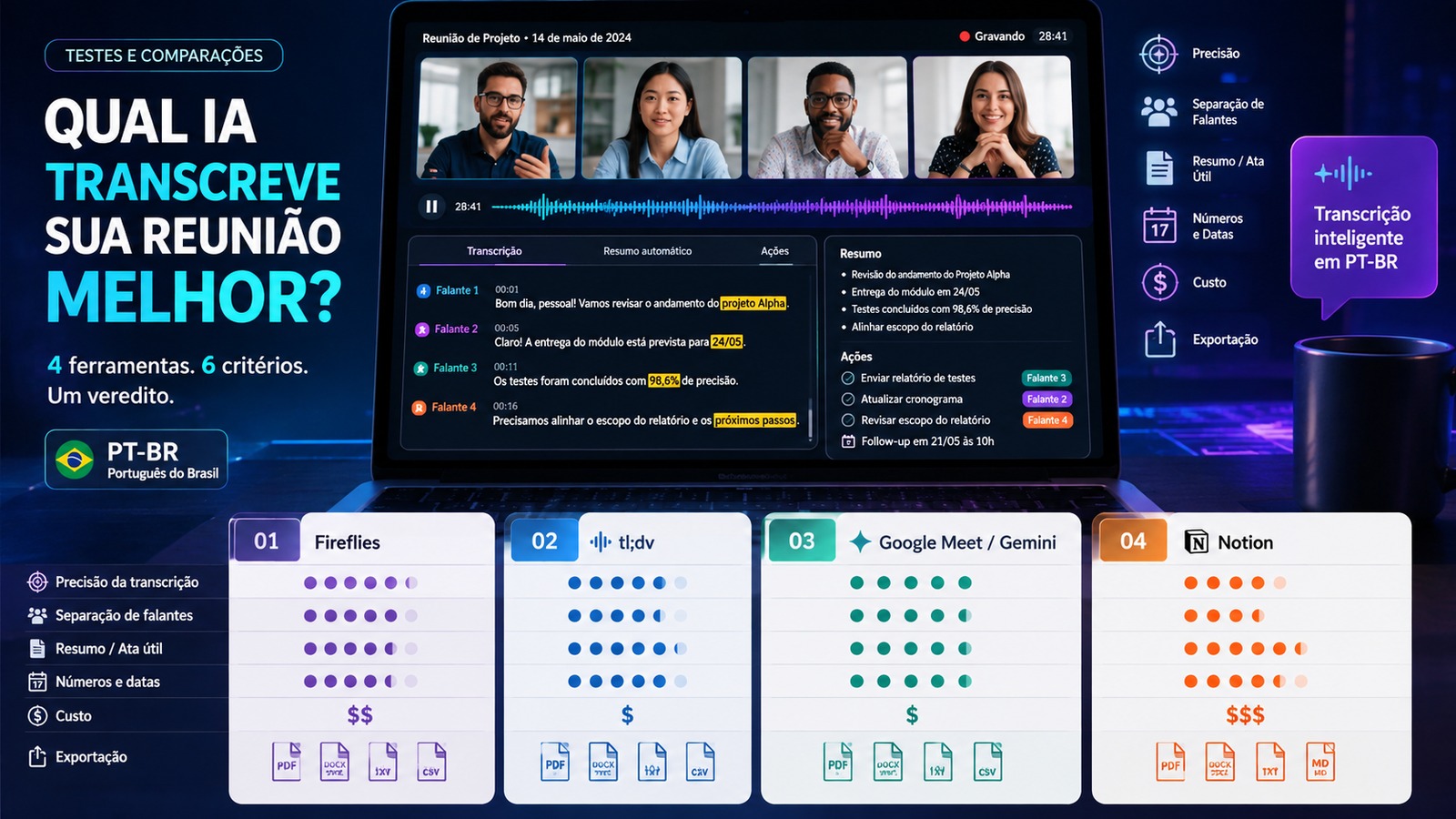
In the current section, Fireflies and tl;dv declare explicit support for Brazilian Portuguese. Google Meet with Gemini supports Portuguese for the automatic notes feature, but works with one language at a time in the meeting. Notion AI Meeting Notes also supports Portuguese, but the documentation itself states that speaker labeling is currently only available in English. This already changes the choice for teams that need to know with certainty who said what.
The practical conclusion is to separate two questions. The first is eligibility: does the tool meet the team's language, platform, workflow, and privacy requirements? The second is quality: when everyone receives exactly the same set of meetings, which produces the most faithful transcription, speaker assignment and minutes? This is the second question that a PT-BR benchmark needs to answer.
What the documentation already allows you to conclude before testing
Fireflies: specific support for PT-BR and option for multilingual meetings
The Fireflies documentation lists Portuguese (Brazil), with code pt-BR, separately from generic Portuguese and Portuguese from Portugal. The service also provides automatic detection modes and a multilingual mode capable of recognizing more than one language in the same conversation. For Brazilian teams that alternate Portuguese and English on the same call, this is a relevant operational difference even before measuring accuracy.
What this documentation doesn't solve is the main question of the benchmark. Supporting pt-BR does not say how many proper names will be preserved, whether “R$ 1.5 million” will be transcribed correctly, whether an internal acronym will be recognized or whether two people speaking at almost the same time will be attributed to the correct speaker. These points need to be measured with real audio.
tl;dv: Brazilian Portuguese is on the list and the product is multiplatform
tl;dv reports transcription in more than 30 languages and dialects, including Portuguese (Brazil) and Portuguese (Portugal). The tool is also presented as compatible with Google Meet, Zoom and Microsoft Teams, which naturally puts it in comparison for teams that do not concentrate all meetings on a single platform.
The vendor page describes recording, transcription, summaries and automations, but the high accuracy claim is marketing the product itself, not an independent comparative result. For the editorial benchmark, tl;dv should be treated as a candidate, not an anticipated winner.
Google Meet/Gemini: strong native integration, limited to one language at a time
Google Meet's “Take notes for me” feature is available in Portuguese and generates notes organized in Google Docs. After the meeting, the document remains in the organizer's Google Drive and can be linked to the Calendar event according to the configured permissions. For a team that already works entirely in Google Workspace, this integration reduces export and sharing steps.
The important limitation is linguistic: Google reports that the feature works with one language at a time and that multiple languages spoken in the same meeting are not currently supported. In Brazilian companies that frequently switch between Portuguese and English, this scenario needs to be included in the test suite, because it can affect both the transcription and the summary.
Notion: Portuguese available, but English speaker labeling
Notion AI Meeting Notes transcribes meetings, generates key points and action items, and includes Portuguese among the available languages. The most relevant limitation for this comparison is explicit: speaker labeling is currently available in English.
This does not make Notion useless in Portuguese. In a one-on-one conversation, presentation, or meeting where the identity of each utterance is not critical, the product can accommodate the flow of notes. But, if the goal is to produce auditable minutes of a meeting with several people, the absence of speaker labeling in PT-BR is a concrete disadvantage that must be weighed even before the textual accuracy test.
How to set up a PT-BR benchmark that doesn't favor a tool
The principle is simple: the four solutions need to receive the same material and be evaluated by the same reference. You should not compare a real call on Google Meet with a clean file sent to a competitor, nor allow manual correction of one result and leave the others raw.
The ideal set combines meetings of different natures. An internal conversation with interruptions tests quick turns; a client meeting introduces names, titles and business terms; a technical discussion presses acronyms and jargon; a planning meeting puts dates, times, amounts, and action items front and center. It is also a good idea to include at least one excerpt with overlapping speech and, if this is part of the company's routine, a meeting alternating between Portuguese and English.
The human answer sheet must be produced from the same audio, word for word, with the speakers identified and without “cleaning” the speech to look like written text. Pauses, corrections, numbers and names need to be recorded with consistent criteria. It is against this template that each automatic output will be compared.
WER measures the text, but does not measure the entire usefulness of the meeting
Word Error Rate, or WER, is a classic speech recognition metric. It adds substitutions, deletions and insertions and divides the total by the number of words in the template. The lower the WER, the better the textual match. It is an important starting point because it prevents the comparison from being based solely on subjective impressions.
Even so, two transcripts with similar WER can have very different uses. Getting a preposition wrong and the customer's name wrong count as errors, but the second can be much more serious for whoever will use the minutes. Therefore, the benchmark needs to maintain additional metrics for proper names, acronyms, products, jargon and technical terms.
In Brazilian Portuguese, accents and short words also deserve review. A system can produce fluid sentences and even change “no” to “no”, confuse “there” and “a” or convert a monetary value into another format. The final reading needs to identify errors that change meaning, not just count divergent words.
Speaker assignment must be measured separately
Diarization answers the question “who spoke when?”. In meetings, this is as important as recognizing words. A minute that attributes a decision to the wrong participant can be more dangerous than a transcript with a few spelling errors.
The test must mark each turn on the template and check two things: whether the tool separated the correct number of voices and whether it attributed each excerpt to the right person. Overlapping speech should receive its own evaluation, because it is common for systems to work well in clean turns and get confused when someone interrupts another.
This criterion is especially decisive for Notion in the current scenario, as the documentation itself limits the labeling of speakers to English. For Fireflies, tl;dv and Google, the existence of names in the interface does not replace measurement: it is necessary to check what happens in the Brazilian audios used by the team.
Names, numbers and dates deserve their own error spreadsheet
In work meetings, the most costly mistakes are rarely evenly distributed. Person's name, company name, product code, acronym, order number, percentage, value, date and time are usually the information that the reader returns to check later.
Therefore, in addition to the overall WER, the benchmark must count how many critical entities were recognized correctly. An excerpt like “R$42,700 by September 24th, with a margin of 8.6%” is much more informative for the test than a generic phrase. It's also worth including less frequent Brazilian names and internal company terms, because that's where differences between models tend to appear.
Summary and action items need to be compared to the meeting, not each other
A summary can sound professional and still be wrong. The evaluation must verify whether the tool preserved decisions, pending issues, responsible parties, deadlines and reservations without adding facts that were not said. The template for this step does not need to be a complete transcription; it can be a short human minute, prepared after the verbal reference is ready.
Loyalty weighs more than style. If a system produces an elegant minute but turns a hypothesis into a decision, it should lose points. Likewise, an action item should only count as correct when the action, owner, and deadline are actually supported by the conversation.
Latency, cost and export come after minimum quality
The most accurate tool may not be the best choice if the result takes too long, if the necessary plan is expensive for the actual volume or if the output does not fit into the team's flow. The cost must be calculated based on the company's usage scenario: number of users, monthly hours, required resources, storage and any plan limits. Comparing just the entry price can artificially favor a product.
Latency can be measured from the end of the meeting until the time the transcript, summary, and action items are ready. For export, the test must record how many steps are necessary to take the minutes to the actual destination: Google Docs, Notion, CRM, ticket system or local file. Native integration can overcome a small difference in accuracy when reducing recurring manual work.
How to turn metrics into a grade without hiding what matters
A single score is useful for ordering the results, but only after the individual metrics have been published. For a team that uses minutes as a record of decisions, textual accuracy and speaker assignment should receive the most weight. For a sales team, names, values, CRM and action items may weigh more. For research or interviews, verbatim transcription and ease of exporting raw content may be a priority.
A reasonable initial distribution is to give the largest portion to transcription and speakers, reserve a relevant range for names, numbers, and dates, and divide the remainder between summary, action items, latency, cost, and export. The important thing is to declare the weights before looking at the result. Adjusting the formula after seeing who won destroys comparability.
What each person needs to prove in the Brazilian test
Fireflies need to confirm in practice the documentary advantage of pt-BR
Fireflies comes out strong in the pre-test because it explicitly recognizes Brazilian Portuguese and offers multilingual mode. The benchmark needs to show whether this coverage translates into lower WER, good speaker separation and preservation of names, acronyms and numbers in the team's audio.
tl;dv needs to turn broad support into measurable success
tl;dv also speaks Brazilian Portuguese and operates on the three major video conferencing platforms. Your performance should be measured on the same files, without using the vendor's own claims of accuracy as evidence of victory. If there is an advantage, it needs to appear in the human feedback.
Google Meet/Gemini needs to show how much integration makes up for language limits
For Google Workspace-centric organizations, generating notes directly in Docs and linking them to the Meet ecosystem is a real operational benefit. The test, however, must measure Portuguese spoken with accents, names and company jargon, in addition to including a bilingual meeting when this is part of everyday life. The limit of one language at a time can be decisive in this scenario.
Notion needs to be evaluated with the speaker limit in sight
Notion has the advantage of maintaining transcription, summary and knowledge within the workspace, but the current limitation of speaker labeling in English weighs directly against a benchmark of meetings in Portuguese with multiple participants. For teams that don't rely on this assignment, it can still compete on summary, action items, and documentation flow.
So which AI to choose for meetings in Portuguese?
Without running the controlled benchmark, there is not enough technical basis to declare Fireflies, tl;dv, Google Meet/Gemini or Notion as universal champion of accuracy in PT-BR. What you can decide now is the composition of the shortlist.
If the meeting usually alternates languages, Fireflies today has the clearest documentary advantage by offering a multilingual mode. If the team works on Google Meet and Google Docs all day, Gemini can win on integration even if another solution has a small recognition advantage. If the company uses Meet, Zoom and Teams and wants to compare a platform-independent tool, Fireflies and tl;dv are natural candidates for a side-by-side test. If identifying Portuguese speakers is a mandatory requirement, Notion's current limitation needs to be treated as an obstacle, not a detail.
The best choice, therefore, does not start with the note on a sales page. It starts with four or five representative recordings, a human template, and defined criteria before measurement. The tool that wins in this material is the one that has the greatest chance of working in your real environment - and that result is much more useful than any generic ranking.