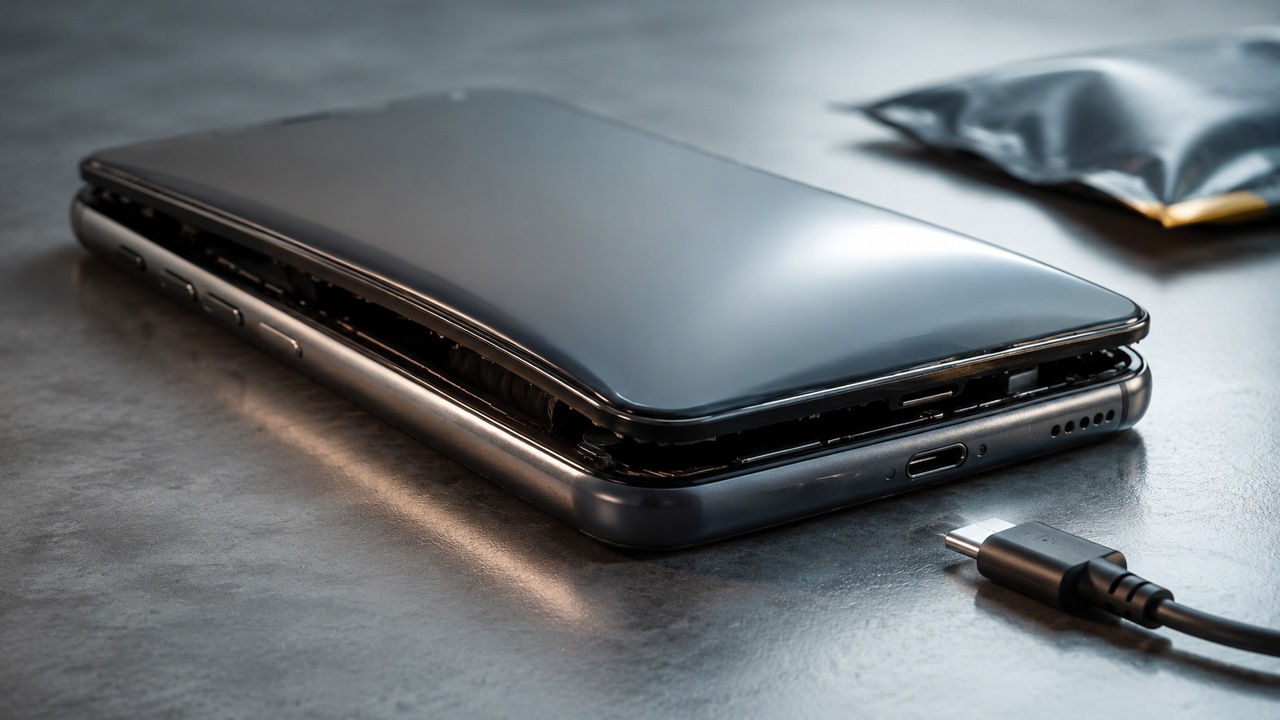
If the screen or back cover of the cell phone started to come loose without an obvious drop, the battery needs to be at the forefront of suspicion. A swollen battery is not just a cosmetic defect or a sign to “use it until it runs out”. Swelling indicates that something has physically changed inside the cell, and manufacturers such as Apple and Samsung advise stopping use if the battery is damaged or swelling and seek technical assistance.
The most important point is simple: do not continue carrying a cell phone if you suspect a swollen battery. If it is possible to turn it off without pressing, bending or forcing the housing, turn it off and keep it unused until evaluation. If the device is very hot, releasing smoke, making unusual noises or showing another sign of active failure, avoid handling it and prioritize removing people from the location.
How to recognize a swollen battery without opening your cell phone
In many current devices, the battery is glued inside a closed housing. Therefore, the user usually notices the problem due to the consequences of the volume increase, not the battery itself.
One of the most typical signs is the appearance of a gap between the screen and the frame or between the back cover and the body of the device. The opening may start at one point and increase over time. The cell phone may also no longer rest flat on the table, appear warped or no longer fit into a hard case like it used to.
The raised screen does not alone prove that the battery has swelled. Aging glue, impact, chassis warping and previous repairs can also separate components. The practical difference is that a progressive opening, without a clear mechanical cause, must be treated as a suspected swollen battery until a technician examines the device. No need to open your phone at home to “confirm”.
It's also not worth relying solely on the system's battery health indicator. This number primarily measures estimated capacity and performance; it does not replace physical inspection. A device can continue to turn on and appear to have reasonable autonomy even with a mechanical change that requires evaluation.
What really makes a battery “suffocate”
The idea that the battery swelled because it “accumulated too much charge” is a misleading simplification. Cell phones use rechargeable lithium-ion batteries and, in many models, the cell has a pouch format, with a flexible, sealed casing. Inside there are electrodes, separator and electrolyte working in controlled electrochemical reactions.
With aging or under stress conditions, parallel reactions can degrade internal components and generate gaseous products. Since the cell is sealed, these gases take up space. In a pouch cell, this increase in volume physically appears as bulging and can push against the screen, cover and other components of the phone.
This mechanism is documented in experimental research. Studies with pouch-type lithium-ion cells have identified gas generation associated with reactions and decomposition of electrolytes, a process that can affect both service life and safety. The chemical details vary depending on the materials, the condition of the battery and the conditions of use, so there is no single universal cause for every swollen cell phone.
Why heat, age and damage matter
Batteries are consumable components: they degrade over time and with charge and discharge cycles. This doesn't mean that every old battery will swell, but it does mean that an aging cell accumulates chemical and structural changes that reduce its performance margin.
Temperature also matters. Samsung advises that continuous use or charging in extreme temperatures can accelerate battery deterioration and recommends avoiding leaving the device for long periods in hot environments, such as a car in the sun. Heat is not the only explanation for swelling, but it accelerates several degradation reactions and can worsen already unfavorable conditions.
Physical damage falls under the same cautionary logic. Dropping, crushing, puncturing, excessive bending or contact with liquid may compromise the cell or its controls. Apple advises you to discontinue use when damage to the iPhone or battery is suspected and warns that piercing or crushing the device can damage them.
There may also be internal defects or abnormal load situations. The important thing is not to turn identifying the cause into a domestic investigation. When the casing is already being pushed from the inside out, the safe decision does not depend on figuring out whether the trigger was age, heat, impact or a manufacturing flaw.
Why continuing to use is not a good bet
A swollen battery doesn't mean the phone will catch fire immediately. The problem is different: swelling is visible evidence that the cell is no longer in its normal condition. Continuing to subject this component to loading, unloading, heating and mechanical pressure adds stress just when its integrity is already in doubt.
As the cell expands, it can press on the screen, the lid and the internal assembly itself. Further damage could compromise layers that keep the electrodes electrically separated. In failure scenarios, an internal short circuit can quickly raise the temperature and trigger more severe reactions. That's why manufacturers treat damaged batteries as a safety issue, not just autonomy.
Apple states that an iPhone battery should be repaired by a trained technician to prevent damage that could cause overheating, fire or injury. In specific guidance regarding a swollen battery, Samsung recommends not continuing to charge the device and contacting a repair center for inspection and service.
What not to do with a bloated cell phone
Do not try to press the screen or cover to make it reseat. If the battery is pushing against the case, compressing it transfers force to a cell that is already deformed.
Do not puncture the battery to release the gas, do not bend the device and do not try to remove the cell with improvised tools. Lithium-ion batteries are sensitive components, and damage from drilling, crushing, or improper disassembly can increase the risk of heat, fire, and injury.
Also, do not reconnect the charger to finish a backup, test if it “still works” or try to discharge the battery to zero. The most conservative advice is to stop using it and take the device for evaluation.. If your data is already synchronized in the cloud, recover it using another device. If not, notify support that there is important data before authorizing the repair, rather than keeping the phone on just to copy it.
Finally, do not dispose of a damaged battery or device in household waste. Apple, for example, advises that batteries be recycled or disposed of separately, in accordance with local environmental rules. Manufacturer assistance, reverse logistics programs and adequate electronics collection points are preferable paths to common disposal.
What to do in practice
If you notice opening of the screen, lid or deformation compatible with swelling, stop charging and using it. Do not force the structure to “see how much it opened”. Keep the device away from heat, flames and objects that could puncture it, and seek the manufacturer's support or qualified assistance to confirm the cause and determine whether to replace the battery or other necessary repairs.
If the suspicion is ruled out and the problem is just adhesive or external deformation, assistance can treat the correct failure. If swelling is confirmed, the battery needs to be replaced and the technician should assess whether the expansion also damaged the screen, cover, chassis or other components.
The safe limit for user action ends before opening the device. Recognizing the signal, stopping charging, avoiding pressure, and sending the phone for evaluation solves the most important part of the problem without turning a battery defect into a risky home repair attempt.