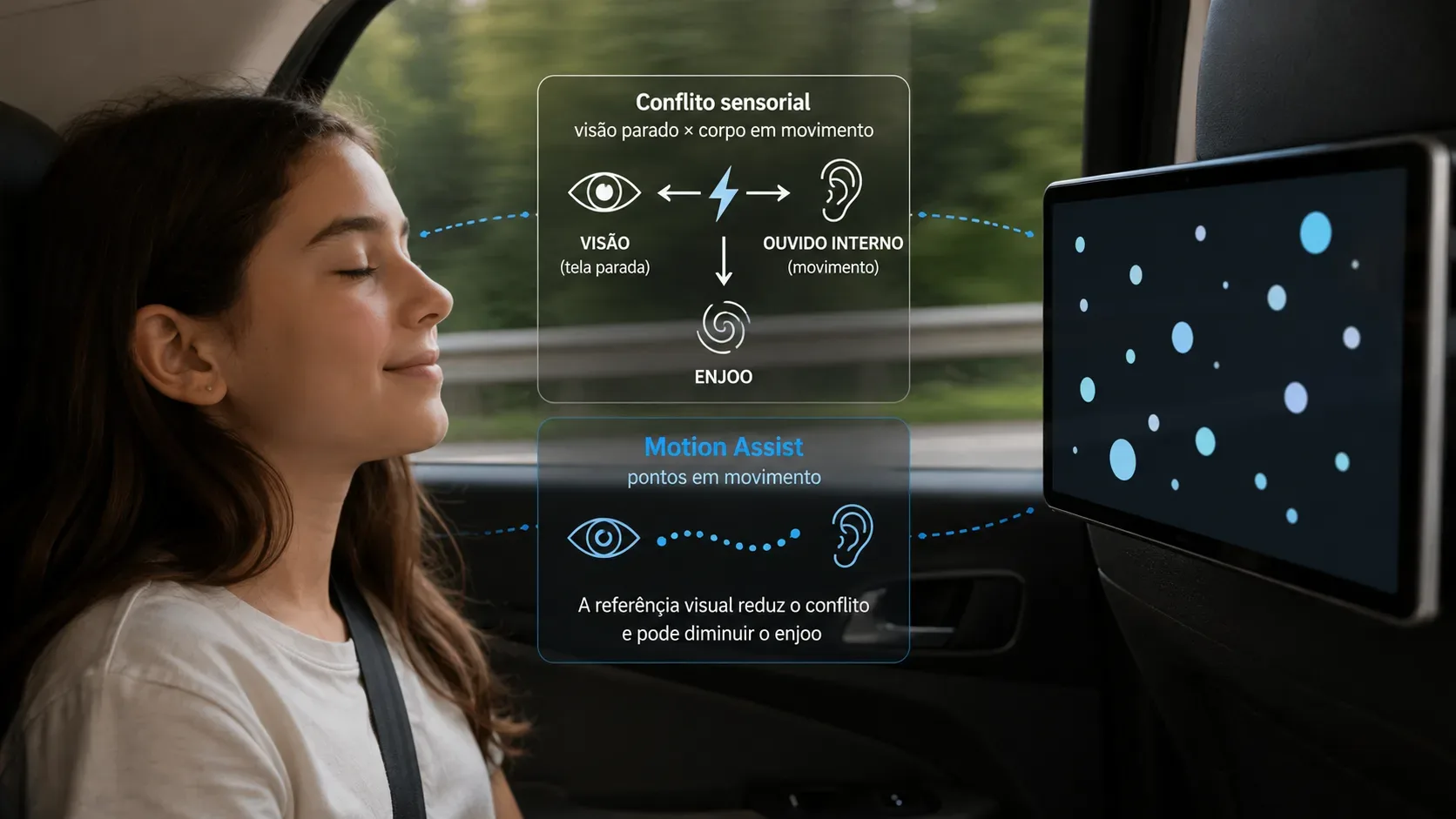
Looking at a phone inside a moving car creates an unusual situation for the brain: the screen appears stationary while the body accelerates, brakes, and turns. Motion Assist, announced by Google in the September 2026 Android Drop for phones running Android 17, tries to reduce that mismatch by adding a bubble overlay that moves with the vehicle. The goal is not to “cancel” motion sickness, but to give the eyes a visual cue that the body is moving.
This principle fits the most widely accepted explanation for motion sickness, known as sensory conflict or neural mismatch. It is also consistent with studies testing motion-synchronized visual cues in vehicles. There is, however, an important caveat: results from similar experimental systems do not, by themselves, prove that Android’s specific Motion Assist implementation will work for every person and situation.
Why can reading in a car make you sick?
To estimate orientation and motion, the brain combines information from several sources. Among the most important are vision, the vestibular system in the inner ear, and signals from the body itself. The vestibular system detects linear acceleration and head rotation, while vision helps indicate whether the environment appears to move relative to you.
When a passenger looks out the window, those sources can tell reasonably compatible stories: the inner ear senses turns and acceleration while the outside scenery also moves across the visual field. The mismatch can grow when the person focuses on a book or a screen. The content in front of the eyes remains stable even though the vehicle is accelerating the body.
The CDC Yellow Book describes sensory conflict as a mismatch between vestibular, visual, and kinesthetic patterns arriving at the brain and the patterns expected by an “internal model.” From that perspective, looking at the horizon or stopping a visual task can help because it reduces the disagreement between what vision reports and what the vestibular system senses.
What do the bubbles add to vision?
According to Google’s announcement, Motion Assist adds a subtle bubble overlay that moves with the vehicle and is designed to bridge the gap between what the eyes see and the motion of the ride. Instead of forcing the passenger to look outside, it tries to bring a motion reference onto the screen itself.
In perceptual terms, the bubbles can act as visual motion cues. If the phone detects that the car accelerates, slows down, or changes direction and the animation responds coherently, the eyes no longer receive only the message that “everything is still.” They also receive an indication of motion that is more compatible with what the inner ear is registering.
The wording matters: the bubbles may reduce conflict. They do not replace the vestibular system, neutralize physical forces, or switch off the pathways associated with nausea. The hypothesis is that visual information better aligned with real motion reduces one of the discrepancies that can contribute to symptoms.
Why can moving dots work without showing the road?
The brain does not need a photographic reproduction of the scenery to extract information about motion. Simple patterns that change position over time can provide cues about direction, acceleration, and displacement. It is the same broad principle by which visual flow in the outside world helps a passenger perceive that a vehicle is moving even when the passenger is not controlling it.
A 2024 review in Ergonomics concluded that visual cues can reduce motion sickness in certain in-vehicle configurations and noted that, across the studies it reviewed, cues presented in peripheral vision tended to work better than cues limited to central vision. That helps explain why subtle systems placed around the main content are an attractive research direction: they can provide motion information without replacing what a person is reading or watching.
There is also recent experimental evidence. A 2026 Applied Ergonomics study conducted on the road with passengers using virtual reality compared acceleration-based visual cues with more continuous motion cues. Acceleration-based cues reduced motion sickness about as effectively as velocity-matched cues while causing less distraction from the main task. The finding supports the plausibility of using relatively simple visual signals to represent changes in vehicle motion.
Does this prove that Motion Assist works?
Not conclusively. The literature supports the general mechanism: enriching vision with cues that are coherent with vehicle motion can reduce sensory conflict in some contexts. Google’s public announcement describes the purpose and visual behavior of the feature, but that page does not present a clinical trial or peer-reviewed study specifically evaluating Motion Assist.
That distinction matters. A commercial implementation may differ from research systems in several ways: which sensors it uses, how it filters noise, how much latency exists between physical motion and the animation, where cues appear on the screen, how strong the animation is, and how the algorithm responds to turns, braking, and road irregularities.
Even small differences can matter. If a visual cue is delayed, exaggerated, or inconsistent with the motion felt by the body, it may fail to help. Research on visual countermeasures has produced variable results across experimental designs, which is another reason to treat Motion Assist as a comfort feature rather than a guarantee.
Why might some people benefit while others do not?
Susceptibility to motion sickness varies widely. Age, previous motion sickness, migraine, vestibular characteristics, trip duration, road type, and the activity performed during the ride can all change symptoms. The CDC also notes that motion sickness often builds gradually with exposure and that habituation can reduce the response over time.
- Visual task: reading small text for a long time requires stable central attention and can increase conflict on a winding road.
- Motion intensity: repeated braking, turns, and oscillations can create stronger vestibular stimulation.
- Cue quality: synchronization, direction, and animation intensity can determine whether a cue is helpful or merely distracting.
- Visual field: research suggests a potential advantage for peripheral cues in some setups, but that does not establish one universally ideal position.
- Individual differences: a setting that feels comfortable to one person may be too weak or uncomfortable for another.
Why can looking at the horizon still work better?
Motion Assist is designed to let the passenger keep using the screen, so it operates within a situation that can already favor sensory conflict. Looking outside gives the visual system a much richer set of cues about the vehicle’s real trajectory. Traditional strategies therefore remain relevant: raise your head, look toward a stable horizon reference, stop reading when symptoms begin, and, when possible, sit where the vehicle’s motion is easier to see.
That does not make the bubbles pointless. Their value is precisely that they try to reduce the perceptual cost of continuing to read, browse, or watch something. It is a compromise: add motion information without requiring the person to abandon the screen.
Motion Assist is not a medical treatment
Motion Assist should be understood as a comfort feature based on a well-established perceptual hypothesis and a promising research line on visual cues. It should not be presented as a cure or treatment for motion sickness. Nausea, dizziness, and discomfort during travel can be common, but severe, persistent symptoms or symptoms that also occur outside motion situations deserve professional assessment.
In short, the bubbles may help because they give the eyes information that was missing: “the body is moving.” When that cue follows vehicle acceleration coherently, it can reduce part of the disagreement between vision and the vestibular system. Science supports the logic of the mechanism and provides favorable evidence for synchronized visual cues, but the size of the benefit from Motion Assist will still depend on implementation, context, and the individual user.