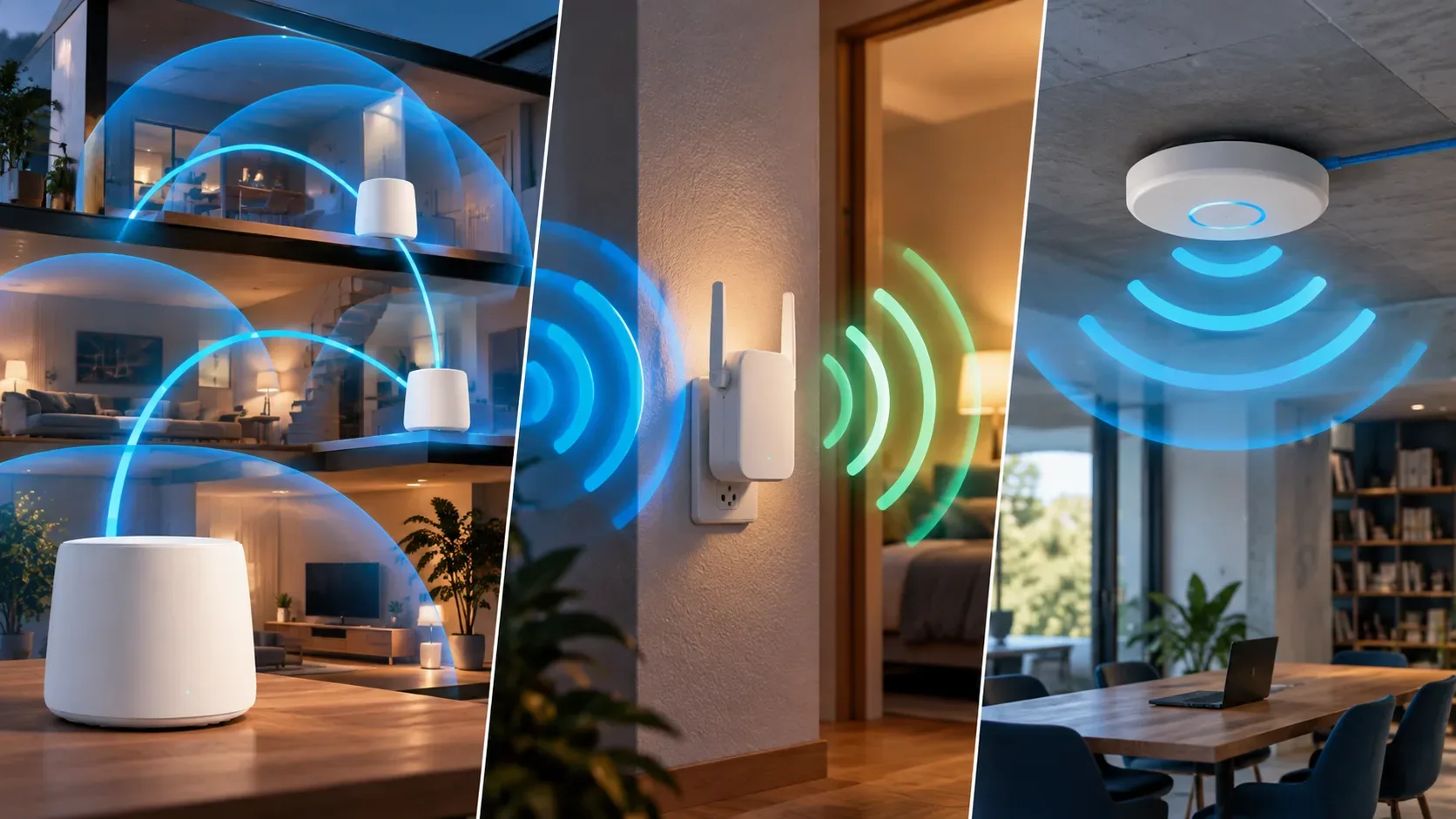
Mesh Wi-Fi, range extenders, and access points address weak or missing Wi-Fi in different ways. The right choice depends mainly on where coverage fails, whether Ethernet is available, and whether you want a coordinated network while moving between rooms.
A range extender receives existing Wi-Fi and retransmits it. An access point normally receives the network through Ethernet and provides Wi-Fi at that location. A mesh system uses multiple nodes that work as a coordinated network, with unified configuration and features that vary by ecosystem.
Which solution fits each scenario?
| Scenario | Solution to consider | Why |
|---|---|---|
| One nearby room has weak signal and no cable | Range extender | It retransmits the network without requiring Ethernet at the destination. |
| Several rooms or floors need coordinated coverage | Mesh | The nodes are designed to operate as a unified system. |
| Ethernet is available in the uncovered area | Access point | The link to the main network uses cable while the radio serves client devices. |
| Walls and floors severely weaken wireless links | Wired AP or mesh with Ethernet backhaul | Cabling avoids relying on a poor Wi-Fi link between network points. |
When a range extender makes sense
A range extender receives the router's signal and retransmits it, so it must be placed where it can still receive a usable connection. TP-Link recommends placing an extender roughly between the router and the weak-signal area and notes that concrete walls, metal, and interference can affect the link.
Range extension and mesh are not the same thing. Some extenders can join a mesh network when they are compatible with the router and the same technology. Outside that context, using the same network name does not prove that the devices form a coordinated mesh.
When mesh is more suitable
In a mesh network, multiple nodes work together and normally share configuration. This makes it easier to cover several areas and manage the network as one system. The link between nodes, called backhaul, can be wireless and, on compatible equipment, Ethernet.
When cable is available between points, Ethernet backhaul reduces dependence on the same walls and floors that impair Wi-Fi. Without cable, node placement is critical because each node still needs an adequate connection to the rest of the network.
Mesh does not mean universal compatibility. Different standards and ecosystems exist. TP-Link, for example, distinguishes Deco, EasyMesh, and OneMesh. Check the documentation for the specific models before combining routers, nodes, or extenders.
When to choose an access point
An access point, or AP, connects to the wired network and creates Wi-Fi at its location. If Ethernet already reaches the uncovered floor, hallway, or office, this topology avoids using wireless for the link back to the main router.
AP mode does not mean creating another router. In TP-Link documentation, a Deco in access point mode expands the existing network while the main router remains responsible for functions such as DHCP. Other devices may also offer AP mode, but available features vary by model.
Roaming depends on more than the network name
Using the same SSID and password at multiple points can simplify connection, but moving from one point to another also depends on the client device and infrastructure features. Mesh systems can coordinate this experience, while independent APs provide different levels of roaming assistance depending on hardware and configuration.
It is therefore not safe to promise completely seamless handoff simply because two devices use the same SSID. For calls, video meetings, or constant mobility, check the roaming features of the complete system.
Walls and multiple floors
Thick walls, reinforced concrete, metal, and floors reduce signal strength. A range extender or mesh node with wireless backhaul still needs an adequate link. When Ethernet is available, an AP or mesh system with wired backhaul can bypass part of that limitation.
Decision tree
- Is Ethernet available in the dead zone? First consider an access point or mesh node with Ethernet backhaul.
- No cable and the problem is small and localized? A range extender may solve it if placed where it still receives a good signal.
- No cable and coverage must reach several areas? Mesh can simplify expansion and management, but placement still matters.
- Want to reuse existing equipment? Confirm that the router and expansion device support the same mesh standard or ecosystem.
- Is mobility a priority? Check roaming features for the complete system, not just the network name.
Do not choose by advertised speed alone
Real-world speed depends on distance, interference, obstacles, radios, bands, channels, backhaul, Ethernet ports, and client devices. First choose the topology that brings coverage to the right place, then compare model specifications.
In short, a range extender is a simple option for a localized gap without cabling; mesh targets coordinated coverage across several points; and an access point is especially logical when Ethernet is available at the destination.