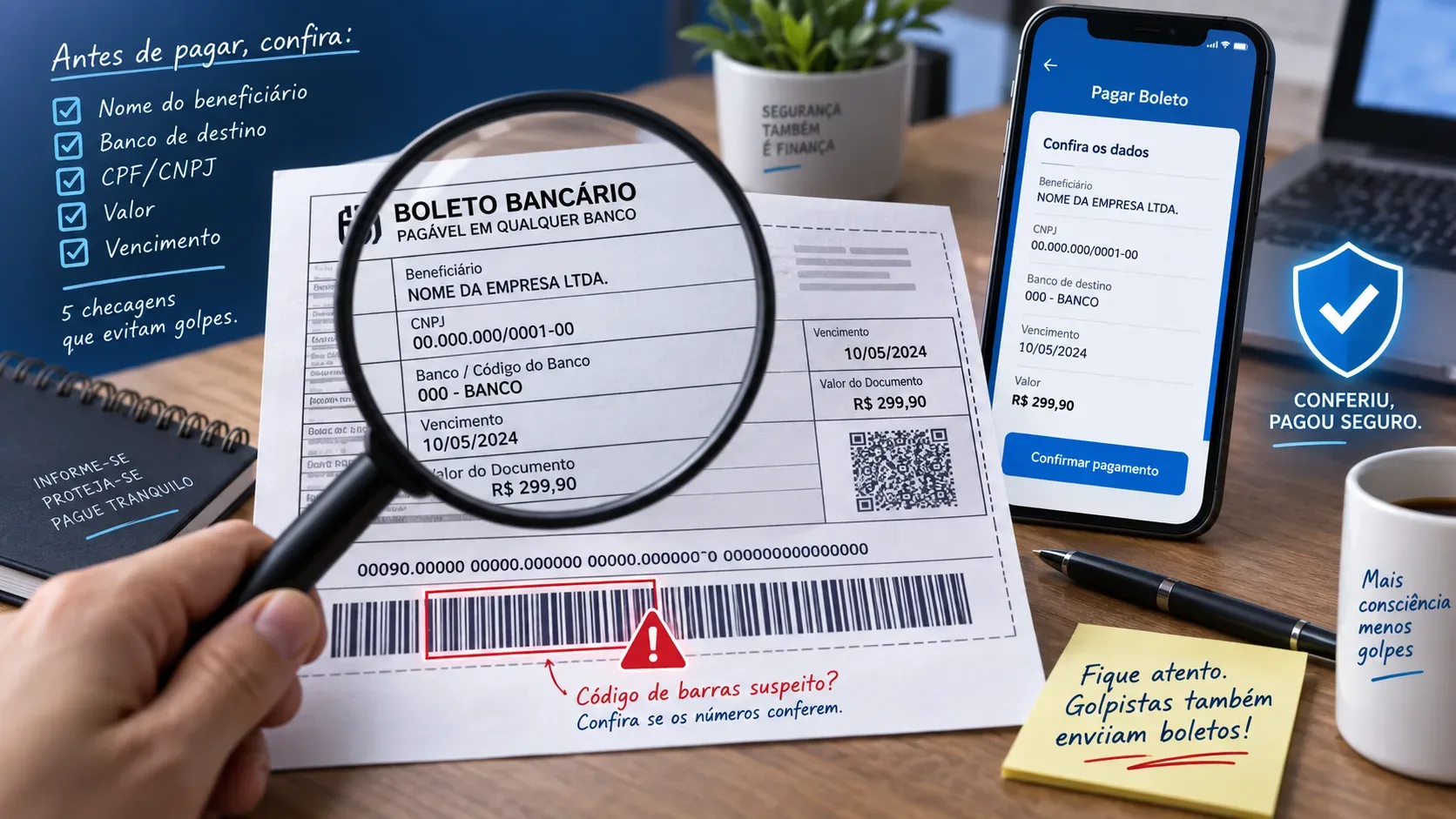
A fake Brazilian boleto can look convincing, carry the right logo and even contain details that resemble a legitimate charge. The decisive check happens before you confirm payment, when your banking app or online banking service returns the data linked to the barcode, the numeric line or the QR Code.
Brazil's Central Bank advises users to compare the information printed on the boleto with the information shown by the bank at payment time. The system shows the actual beneficiary and payment amount, and those details should match the person or company you intend to pay and the amount you expect. For registered boletos, the payment terms stored in the centralized billing database prevail over the paper or PDF information, except when the consultation system is unavailable, inoperative or intermittent.
60 second checklist before paying
| Step | What to verify | Reason to stop |
|---|---|---|
| Source | Did the boleto come from the creditor's official website, app, customer area or email? | A file from an unknown contact, a suspicious link or a replacement copy sent through a channel you do not recognize. |
| Beneficiary | Does the name or legal company name shown by the bank match the intended recipient? | A different person or company, even if the rest of the boleto looks correct. |
| CPF or CNPJ | If the bank displays the beneficiary's tax ID, does it match the expected creditor? | An incompatible tax ID or one belonging to an unrelated third party. |
| Destination bank | Does the destination bank shown during payment match the boleto and the context of the charge? | A different institution from the one indicated on the document or normally used by the creditor. |
| Amount | Is the amount returned by the bank exactly what you expect to pay? | A higher, lower or unexpected amount, even when the printed boleto appears correct. |
| Due date | Does the date make sense for the obligation and any replacement copy you requested? | A date that does not match the charge or a change you did not request. |
1. Start with the source of the boleto
Before checking numbers, confirm where the document came from. The Central Bank recommends contacting the service provider directly through official channels and avoiding boleto copies printed outside the official website or email used by the service. If you need a replacement copy, prefer the app, a website address you enter yourself, the authenticated customer area or another official channel you already know.
It is also safer not to rely on a phone number printed on a suspicious boleto. The Central Bank warns that the number itself may have been inserted by a scammer. If in doubt, find the company's contact details through a source independent from the document you received.
2. The beneficiary is the most important check
After scanning the barcode or entering the numeric line, stop at the confirmation screen. The beneficiary name shown by the bank must match the individual or company that should receive the payment. This is a stronger check than trusting only the logo, PDF header or text printed on the boleto.
If the app also shows a CPF or CNPJ tax ID, compare it with the creditor information you already know. Not every payment flow displays the tax ID in the same way, so treat it as an additional verification when available.
3. Check the destination bank without trying to decode the boleto yourself
The Central Bank explains that the numeric line contains, among other elements, the code of the institution receiving the funds. Ordinary users do not need to interpret every field manually. The simpler approach is to compare the destination bank shown by the banking app with the document and with the creditor that is charging you.
If the destination bank shown on the confirmation screen differs from the one stated on the boleto, the Central Bank's guidance is not to complete the payment. That mismatch should be verified through an official creditor channel.
4. The amount shown by the bank must match the charge
For a registered boleto, the data retrieved through the banking system are central to validation. Before confirming, verify that the amount returned by the bank matches the debt, purchase or service you recognize. Do not assume that a PDF that looks correct guarantees that the payment will go to the expected amount and recipient.
If there is a difference of a few cents, an unexpected discount, an unexplained surcharge or a completely different amount, stop and issue a new copy through an official channel.
5. A strange barcode is a reason to verify, not improvise
The Central Bank advises users to be suspicious of barcodes with visible flaws. If the reader does not work, avoid simply copying a numeric line sent in a separate message or following alternative payment instructions from an unverified contact. Return to the creditor's official channel and generate another copy.
The numeric line and barcode are elements of the payment order, but they do not replace the final verification of the beneficiary, destination bank and amount.
6. If there is a QR Code, know when the payment becomes Pix
Some billing documents include a QR Code. The Central Bank notes that when the QR Code is used to pay through Pix, the money is transferred instantly to the recipient account. On the Pix confirmation screen, verify the recipient's name, institution and amount before authorizing the transfer.
This distinction matters because the steps after a fraud can differ. For a fraudulent Pix payment, the customer can ask their own bank about the Special Return Mechanism, known as MED in Brazil, while a traditional boleto follows the billing compensation process.
What to do if any detail does not match
- Do not confirm the payment. Leave the screen and keep the boleto or message you received.
- Open the creditor's official channel. Use the legitimate app or type the known website address instead of following a link from the suspicious boleto.
- Request or generate a new copy. Compare the beneficiary, bank, amount and due date again.
- If needed, confirm the charge with the company. Use a phone number, chat service or support channel found on the official website, contract or legitimate app.
If you already paid a suspicious boleto
The Central Bank advises contacting your financial institution as quickly as possible and asking it to prevent the funds from reaching the suspected scammer's account when operationally possible. It also recommends filing a police report. If the boleto payment has already been processed, you can file a complaint with the Central Bank against the suspected scammer's institution so that it can provide explanations.
Brazil's Ministry of Justice and Public Security also advises promptly notifying the banks involved, alerting the related company or platform when applicable, and preserving evidence such as the boleto, messages, emails and images of the fraud.
A practical rule for avoiding fake boleto scams
Before paying, use a simple sequence: source, beneficiary, tax ID when displayed, bank, amount and due date. If any item differs from what you expect, do not guess why. Stop the payment and obtain a new copy through an official channel.
For updated guidance on boletos, registration, beneficiaries and fraud, consult the Central Bank's boleto FAQ.