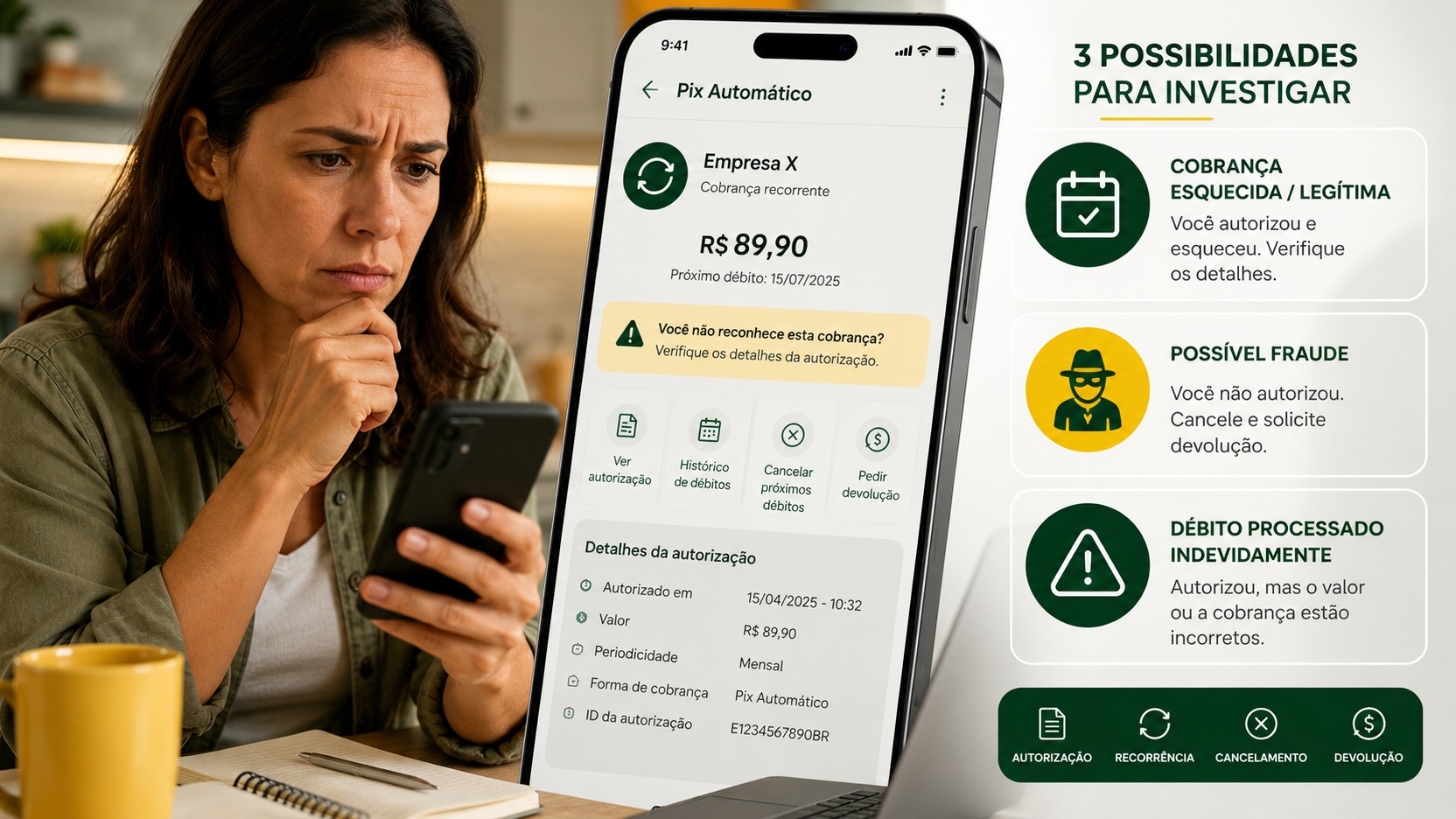
A Pix Automático debit you do not recognize should not be treated as fraud before you check the authorization. Under the framework set by Brazil's Central Bank, the institution that holds your account should only schedule and settle the charge when it matches a valid authorization. Once the money has already left the account, the diagnosis matters because the refund path changes.
In practice, there are three main scenarios: you authorized it and forgot; fraud occurred; or the payment was processed by the payer's bank without a valid authorization, after a cancellation, or in a way that did not match the authorized parameters. The first step is to determine which scenario fits your case.
First, open the authorization before disputing the charge
Brazil's Central Bank requires the Pix Automático area in the app to allow users to view and manage pending authorizations, active authorizations, scheduled payments, and the authorization history. The exact button names may vary by institution, but those functions should be available in the app for the paying account.
Open the authorization linked to the debit and compare its details with what was charged. Look for the recipient's name and CNPJ, the purpose or identifier of the charge, the frequency, the validity period, the scheduled date of the first payment and, when applicable, the fixed amount or the maximum amount you authorized. Then check the history and scheduled payments to see whether any new charges are still planned.
If the name shown on the statement is unfamiliar, compare the CNPJ and the purpose of the charge with contracts, invoices, emails, or receipts you already have. The goal is not to prove fraud based on the name that appeared on the screen, but to reconstruct where the authorization came from.
The authorization may have been created together with a regular Pix payment
One source of confusion is the enrollment flow. In one of the journeys defined by Brazil's Central Bank, a QR Code combines the first immediate payment with the authorization for future recurring charges. The first payment appears as a regular Pix transaction on the statement, while the Pix Automático authorization takes effect for the following charges. In this journey, the confirmation screen must make it clear, including through a specific confirmation, that there will be future recurring payments.
In another journey, the person pays or schedules a charge and only then receives the offer to activate Pix Automático. That is why the authorization history is more reliable for reconstructing what happened than trying to remember only the first debit.
The three scenarios and the refund path
Scenario 1: the authorization exists and the charge matches what was authorized
If you find an active or historical authorization and the charge details match the recipient, frequency, and limits that were authorized, it may be a legitimate charge that you forgot about. In that case, canceling the authorization stops future recurrence, but it does not automatically turn a payment that has already been settled into fraud or reverse the previous debit.
If you no longer want the service, cancel the authorization to prevent new charges and address any contract cancellation or refund request with the receiving company. The Special Refund Mechanism, known by its Portuguese acronym MED, was not designed to resolve a simple commercial dispute or second thoughts about a charge that was correctly authorized.
Scenario 2: there are signs of fraud
If you do not recognize the authorization, do not recognize the recipient, and there are signs that third parties obtained or used your data to create the charge, dispute the transaction with your bank as possible fraud and request the refund through the Mecanismo Especial de Devolução (MED), the Special Refund Mechanism.
Brazil's Central Bank states that a refund request through MED may be made within 80 days of the Pix transaction date. In cases of fraud involving Pix Automático, the analysis involves the participating institutions, and the refund depends on MED rules and on the existence of funds that can be recovered. The full process may take up to 11 days. Therefore, the 11-day period is not a promise of a full refund: it is the maximum period stated for the process, subject to the mechanism's conditions.
When reporting fraud, use your bank's own dispute channel as soon as possible. Brazil's Central Bank also recommends filing a police report when a person has been the victim of a scam or crime, especially when social engineering, account takeover, or misuse of credentials is involved.
Scenario 3: the payer's bank processed a Pix Automático that should not have gone through
This is the point most often confused with fraud. The Pix Automático rules provide a specific treatment when the problem lies in processing by the institution that holds the paying account.
This group includes situations such as the absence of a valid authorization, a charge that is incompatible with the authorization parameters, or an operational failure by the payer's bank, for example when an order is sent despite a cancellation that should already have prevented the debit. In these cases, the paying institution must refund the full amount to the customer using its own funds within 24 hours after the refund request.
The practical difference is significant. In fraud cases, recovery depends on the MED flow and on the
conditions for tracing and blocking the funds. In the specific case of a payer's bank error in Pix Automático, the refund within 24 hours does not depend on funds being available in the recipient's account; the payer's bank may later seek reimbursement through the system itself.
How to cancel future debits
If you want to end the entire recurring arrangement, find the active authorization in the Pix Automático menu and cancel it. For the payer, cancellation is immediate and ends the associated recurrence, preventing new payment instructions. Payments already scheduled for future dates must also be canceled, with one important exception: a debit scheduled for the same day as the cancellation may still be kept.
This means that canceling today does not guarantee that a charge scheduled for today will not occur. If there is still a specific payment scheduled for another day, the user can also cancel it directly in the Pix Automático area until 23:59 on the day before settlement.
For safety, after canceling, check the list of active authorizations and the scheduled payments screen again. Save the receipt or a screenshot of the cancellation confirmation, especially if a future charge was already visible.
What to document before contacting the bank
Before filing the dispute, gather the receipt for the Pix Automático payment that has already been settled, the active authorization screen or authorization history, the recipient's name and CNPJ, the date, time, and amount of the debit, the authorization or recurrence identifier when the app shows that information, any payments that are still scheduled, and confirmation of any cancellation.
These details help turn the generic statement 'I don't recognize this charge' into an objective description of the problem. If there is no valid authorization, say so. If the authorization was canceled before the debit, provide the date and time of cancellation. If the amount or recipient differs from what was authorized, show the discrepancy.
During customer service, ask for and keep the case or protocol number. It is also worth asking which classification the institution is using for the refund: a substantiated suspicion of fraud handled through MED, or an error by the payer's payment service provider in Pix Automático. That distinction determines the process and the expected deadline.
When the deadline is 24 hours and when it can reach 11 days
The up-to-24-hour deadline applies to specific cases of payer's bank error in Pix Automático, such as a debit without a valid authorization, a charge that does not match the authorization, or an operational failure that allowed an improper order. The clock starts after the user submits the refund request.
The deadline that may reach 11 days is tied to fraud handled through MED. Under that process, the money may be blocked and traced according to the mechanism's rules, but the refund depends on the outcome of the analysis and on recoverable funds. These are different processes; therefore, it is not correct to apply the 24-hour deadline to every unrecognized Pix Automático charge or to automatically accept that every case should be treated as fraud.
Do not delay the request either. Brazil's Central Bank states that the deadline to request a refund through MED is up to 80 days from the transaction date.
If the bank does not resolve the issue or classifies the case incorrectly
If the app's own screens show that there was no valid authorization, that the authorization had been canceled, or that the charge violated the authorized parameters, present that evidence and ask for the classification to be reviewed. The specific Pix Automático rule for a payer's bank error is different from the fraud process.
If the response remains unsatisfactory, use the institution's formal channels, including its customer service channel and ombudsman where applicable. Brazil's Central Bank advises that unresolved situations may also be taken to the BC complaint channels and, depending on the nature of the problem, to Procon or the courts. These channels do not replace the initial dispute with the bank, which should be filed as early as possible.
The short answer for someone who saw the money leave the account
First open the Pix Automático menu and check the authorization, history, and scheduled payments. If the authorization is legitimate and the charge is correct, cancel the recurrence for the future and address any refund with the recipient. If there is fraud, dispute it through the bank and activate MED. If the debit was made without a valid authorization, after cancellation, or in a way that did not match the authorized parameters, ask the bank to treat the case as a payer-side error in Pix Automático, a situation in which Brazil's Central Bank provides for a full refund within 24 hours after the request.
The rules described here reflect Brazil's Central Bank documentation for Pix Automático updated in August 2026. Because screens and menu names may vary between banks, look for the equivalent functions for authorizations, scheduled payments, history, and disputes within the Pix Automático area of your app.