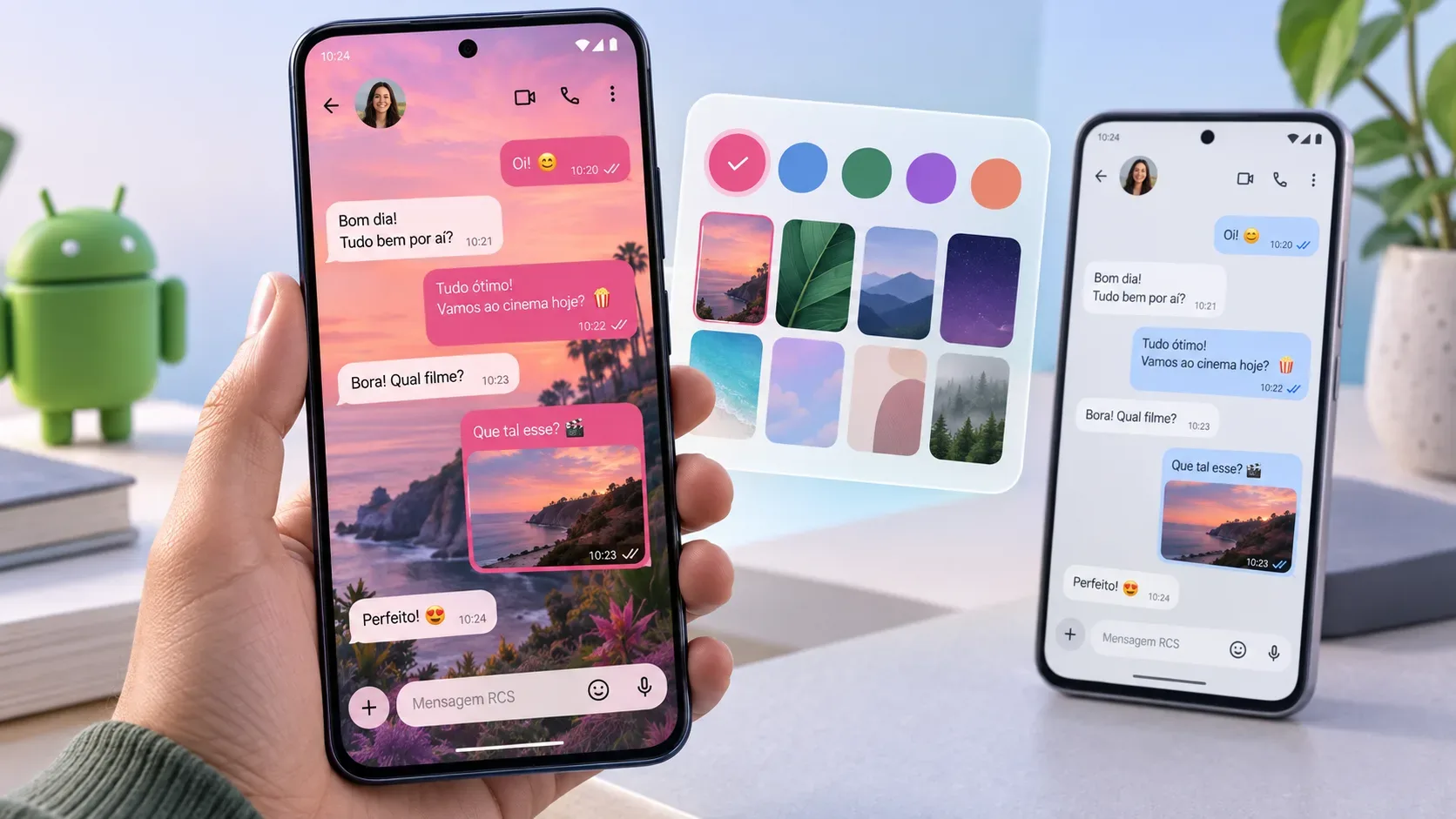
The Chat theme feature in Google Messages lets you give each conversation its own look by combining a background with message-bubble colors. Google highlighted the feature in the September 2026 Android Drop and says it is available now in Google Messages. The key point to avoid confusion is its scope: the theme you choose is visible only to you.
What chat themes change — and what they do not
For the appearance of a conversation, you can choose a color palette, use a preset wallpaper, or select a photo from your device. When a background is applied, the message-bubble colors can automatically match the look, and you can still choose a different color combination.
- Changes on your screen: the conversation background and message-bubble colors.
- Can differ by conversation: one chat can use a photo, another a color theme, and another can stay on the default look.
- Does not change for the recipient: Google’s documentation says chat-theme changes are visible only to the person who created them.
- Does not turn the background image into sent content: choosing a photo for the theme customizes your local interface; it is not the same as sending that photo in the chat.
This local scope is different from collaborative features in Messages. A theme does not need to be “accepted” by the contact or visually synchronized with the group.
How to change a conversation’s background and colors
- Open Google Messages.
- Open the conversation you want to customize.
- In the top bar, tap the recipient or group name. On some interfaces, you can also open the More menu in the upper-right corner.
- Tap Chat theme.
- Choose a color palette and, if you want, a background.
- Tap Apply.
Google’s Help Center uses “Chat theme” for the feature. Because menu names and layouts can vary with language, app version, and device, small visual differences are normal.
Use your own photo as the background
Inside the theme picker, choose the option to use a photo and select an image from your device. Google also provides preset wallpapers organized by category. After choosing one, review the background-and-color combination and apply the theme.
In practice, a simpler photo with lower visual contrast usually keeps message bubbles easier to read. If the result feels busy, try a less detailed image or a more neutral color palette.
What “visible only to you” means
Google explicitly says the theme is visible only to the user who created it. That means switching a conversation to a beach background, a family photo, or a purple palette does not make the other person see the same design.
The same logic applies in a group: your customization is local. As a result, different participants can keep different appearances for the same conversation on their own devices.
How to return to the default look
To undo the customization, open the conversation options again, go to Chat theme, choose Reset to default, and confirm with Apply. This removes the custom theme for that conversation on your device.
If “Chat theme” does not appear
Android’s official feature page lists one explicit requirement: RCS must be turned on. Google also notes that product and feature availability can vary by region, carrier, and device.
- Check RCS: in Google Messages, tap your profile picture or initial, then go to Messages settings > RCS chats and make sure RCS is enabled.
- Check the status: the RCS screen itself shows whether the connection is “Connected,” still being verified, or having trouble.
- Keep Google Messages up to date: if RCS is active and the menu still does not appear, check for an app update and keep in mind that availability can vary across devices and markets.
The current documentation ties Chat theme to RCS but does not list Android 17 as a specific requirement for this feature. That helps distinguish chat themes from other features in the same Android Drop that do have an explicit operating-system version requirement.
What changed compared with color-only customization
Google Messages already offered conversation-color customization. Chat theme expands that idea by combining message-bubble colors with preset wallpapers or a photo chosen by the user. If you previously used only “change colors,” the practical difference is that the conversation background can now be part of the theme.